Brand Impersonation in Email: The Four Attacks, and What Actually Stops Each One
Brand impersonation is any email attack in which a message pretends to come from an organization the recipient trusts - a streaming service, a bank, a document-signing platform, a government agency, or your own company. Scammers use it because borrowed trust works: a recipient who would delete an unknown sender's mail will open, click and act on something that looks like a brand they already deal with. The goal is usually credentials, payment details, or a foothold for fraud.
In practice, "brand impersonation" is not one technique. It is at least four distinct attacks, and each one is defeated by a different defense - which is why no single DNS record or filter setting makes a brand safe. This note walks through all four, using real fraudulent emails collected in our own mailboxes during one recent week, including one that impersonated our own domain. The brands that appear below (PlugandPlay, Paramount+, Adobe, DocuSign, HMRC) are victims of impersonation, not senders.
Attack 1: Display-name impersonation - the lie no protocol checks
The display name - the friendly text before the real address - is attacker-controlled free text. No authentication protocol checks it. The first specimen of the week arrived at one of our bounce mailboxes - a technical address that never belonged to a person and appears only inside the headers of our campaign mail. The attackers could only have harvested it from circulated email data, which says something about how these target lists are built. The display name is doing all the work:
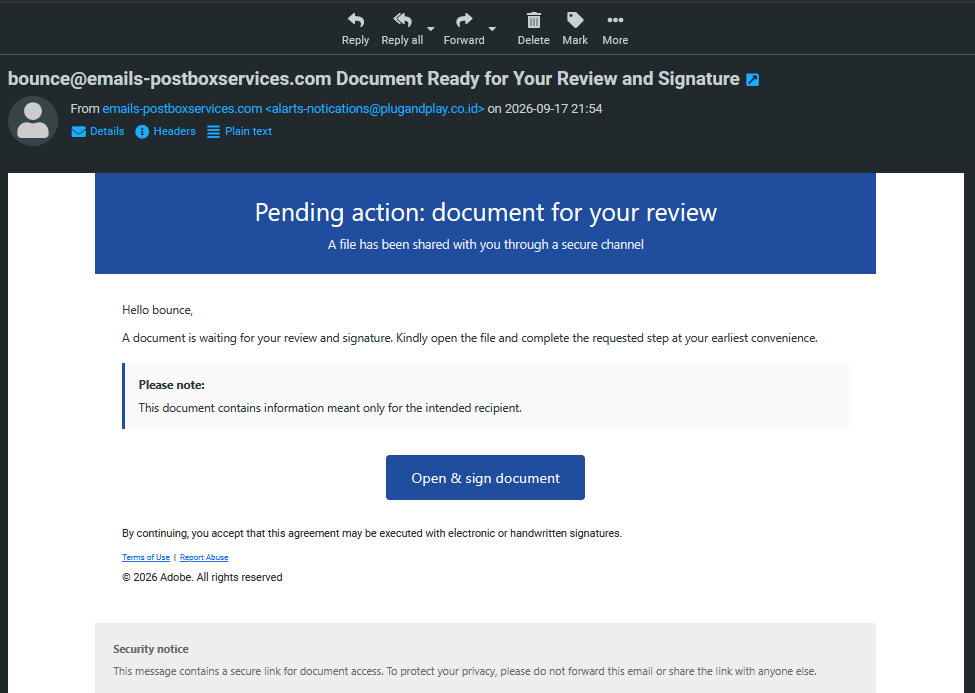
Look at the From line: the display name says emails-postboxservices.com - one of our real campaign domains - but the actual address is alarts-notications@plugandplay[.]co[.]id (note the attacker-typo localpart). The lure is a fake Adobe Sign document. The tell is sitting in plain sight, which is exactly the lesson: always read the real address, never the display name.
Following the "Adobe" button (safely, in isolation) shows where it leads. The link is defanged here so nobody clicks it by accident:
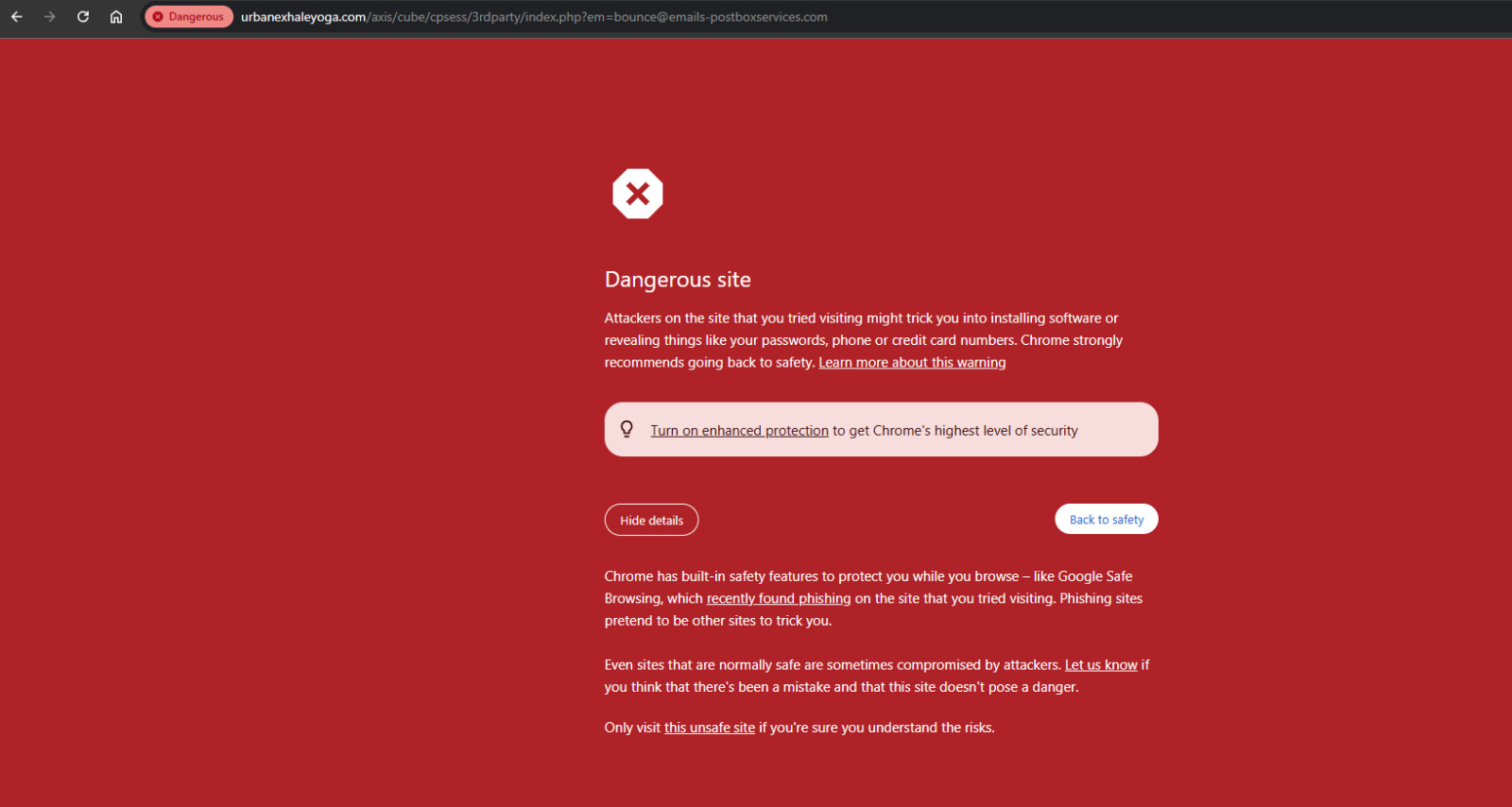
hxxps://urbanexhaleyoga[.]com/axis/cube/cpsess/3rdparty/index.php?em=bounce@emails-postboxservices[.]comTwo things to notice. First, the destination is not Adobe - it is a compromised legitimate website (that /cpsess/3rdparty/ path is the debris of a hijacked hosting account). Second, the harvested victim address is carried right in the URL as the ?em= parameter: opening the link would confirm to the attacker that the address is live and monitored. By the time we checked, Google Safe Browsing had already flagged the landing page:
Here is the part most articles miss. We pulled the full headers, and this phish passed authentication:
Authentication-Results: [our receiving server];
    dkim=pass (2048-bit key) header.d=plugandplay[.]co[.]id
...
Received: from WIN-VN5FAIQCAOF ([185.251.19.134])
    by smtp-relay.gmail.com with ESMTPS ...
X-Relaying-Domain: plugandplay[.]co[.]id
From: "emails-postboxservices.com" <alarts-notications@plugandplay[.]co[.]id>
The message was sent from a Windows machine through Google's own SMTP relay, using a Google Workspace tenant (plugandplay[.]co[.]id - either compromised or registered by the attacker). DKIM passes with a 2048-bit key. Every check is green - for the attacker's domain. Authentication proves who sent a message; it says nothing about who the message claims to be. That distinction is the heart of modern phishing.
One more field in this signature repays a closer look. Google stamped the DKIM signature with darn=emails-postboxservices.com, a tag from DARA ("Declare All Recipients and Affirm"), an experimental anti-replay proposal from Google and Fastmail engineers (an individual IETF draft). The darn= form records the recipient domain and marks it as not participating in the protocol, so the domain the message was addressed to is baked into the signed material. That gives a later receiver a way to notice the signature turning up at a different domain, though in this non-participating mode acting on it is optional. The sender did not choose this - Google's relay adds it automatically, which tells you Google is experimenting with recipient-binding in production. The irony is worth pausing on: this phish carries, inside its own signature, an early gesture toward the cure for the replay attack in Attack 3. It also hints at a strategic point: an attacker who wants replay-friendly signatures will avoid Google's infrastructure - which is exactly what the Attack 3 operator did.
Profiling the sending domain itself completes the picture:
![Domain health report for plugandplay[.]co[.]id scoring 55 of 100 - DMARC at p=none monitoring only, and the domain listed on the Spamhaus DBL](/assets/blog/email-brand-impersonation/domain-health-plugandplay.png)
Public registration data fills in the rest of the picture - here is the domain's whois at the time of writing:
![Public whois record for plugandplay[.]co[.]id showing a 2016 creation date, Indonesian registrar PT Jetcoms Netindo, and unsigned DNSSEC](/assets/blog/email-brand-impersonation/whois-plugandplay.png)
Two details stand out. The domain's DMARC sits at p=none - monitoring only. To be precise, that is not what delivered this message (it authenticated cleanly through Google), but it tells you the domain is unenforced - and its DMARC record publishes no rua destination at all, so no aggregate reports are being collected anywhere: the abuse is literally unmonitored, and anything the attacker sends as this domain from other infrastructure is delivered too. And the second detail is the verdict of the wider world: the domain was already listed on the Spamhaus DBL when we checked it, even while its authentication still says "pass".
A close relative of the display-name trick is the lookalike (or "cousin") domain: instead of hiding the fake in the display name, the attacker registers a domain that reads almost like the real one - paypa1.com, microsoft-support.co, or a plausible subdomain string. That mail can authenticate perfectly, because the attacker genuinely owns the lookalike and can publish SPF and DKIM for it. DMARC protects your exact domain, not the ones that merely resemble it, which is why registration monitoring and takedowns - not authentication - are the defense here.
Attack 2: Trusted-brand lures - borrowing someone else's clothes
Most impersonation never touches your domain at all - it borrows a brand every recipient trusts. From the same week:
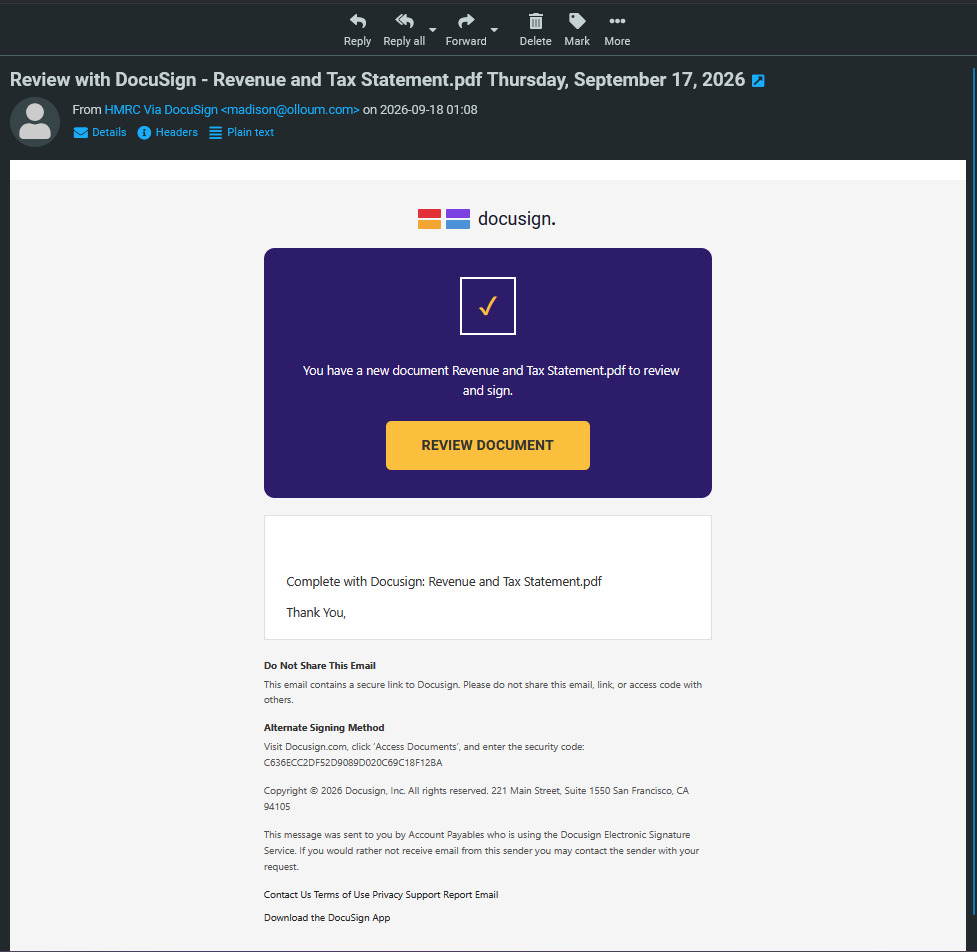
The headers of the "HMRC" message show the identical pattern to Attack 1: sent through smtp-relay.gmail.com by another Workspace tenant (olloum[.]com), dkim=pass, Priority: urgent. Two independent phish, same infrastructure pattern, days apart - this is an industrialized technique, not an anecdote.
And profiling this second sending domain returns a near-identical rap sheet - DMARC parked at p=none, and the domain already on the Spamhaus DBL:
![Domain health report for olloum[.]com scoring 55 of 100 - DMARC at p=none and the domain listed on the Spamhaus DBL](/assets/blog/email-brand-impersonation/domain-health-olloum.png)
Two attacker-used domains, one fingerprint: Google Workspace infrastructure for deliverability, unenforced and unwatched DMARC, and a Spamhaus DBL listing when we checked. If you run mail domains, this is the profile you never want to match.
For the brands being borrowed, defenses are limited but real: DMARC enforcement on their own domains (so at least the exact-domain variant dies), BIMI with a verified mark, which can give qualifying authenticated mail a recognizable brand indicator at supporting mailbox providers (display is at each provider's discretion), making some fakes easier to spot, registering obvious lookalike domains, and takedown monitoring. For recipients, it is training: the real address, not the display name; the headers, not the template.
Attack 3: DKIM replay - when the signature is genuine
The most technically interesting specimen of the week arrived in a reader's Gmail inbox (headers shared with permission; recipient details redacted). It rendered as a pixel-faithful Paramount+ "subscription inactive" notice:
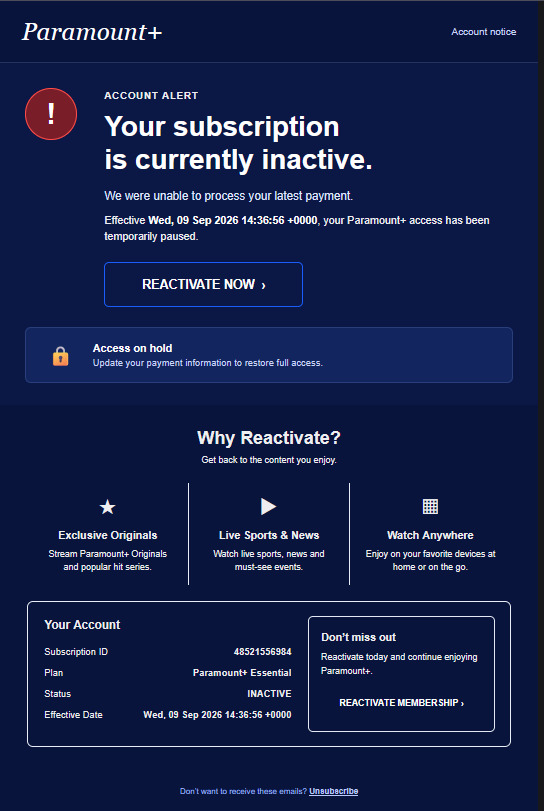
The headers are where it gets interesting:
ARC-Authentication-Results: i=1; mx.google.com;
    dkim=pass [email protected] header.s=pm20250806
    dkim=permerror (no key for signature) header.i=@terra********.study
    spf=pass ... [email protected]
    dmarc=fail (p=NONE sp=NONE dis=NONE) header.from=terra********.study
Note what passes: a DKIM signature from pm.mtasv.net - the shared signing domain of a reputable email service provider. Paramount appears nowhere in the authentication results; the From domain is a throwaway .study domain the attacker registered. Reconstructing the operation from the evidence:
- The attacker built the Paramount-branded template and sent it through the ESP from their throwaway domain - to their own mailbox. The ESP duly signed it with its shared domain key. The replayed copy still contains that first delivery's complete trail: the ESP's bounce address, the receiving server's internal routing headers, even a desktop mail client's status flag - the fingerprints of a message that was delivered once, saved, and reused.
- Two days later, the same signed message was sent to our reader - but not by the ESP. The delivering server was unrelated attacker infrastructure (a French-hosted IP behind a rotating hostname), with a fresh envelope sender on a dynamic-DNS domain to pass SPF.
- At Gmail, the ESP's signature still validated -
dkim=pass- because DKIM signs message content, not the delivery path. A valid signature travels with the message and verifies anywhere, any number of times.
So is this "really" a DKIM replay? Yes - by definition: a legitimately signed message re-sent beyond its original delivery, with the signature still passing. But it is worth being precise about the variant. The classic replay fear is an attacker re-blasting a genuine brand's email. What we caught here is the more common industrial form: the attacker replays their own ESP-signed message, because doing so borrows the ESP's signing reputation at unlimited scale while bypassing the ESP's own sending controls - the ESP would throttle or suspend a customer blasting millions of Paramount lookalikes, but it never sees the replayed copies at all.
Why did Gmail deliver it? Look at the alignment arithmetic: SPF passed, but for the dynamic-DNS envelope domain - not aligned with the From. The ESP's DKIM passed, but for the ESP's own domain - not aligned either. The one signature that would have aligned (the From domain's own) returned permerror: its key had been deleted. So DMARC correctly failed - everything passed, nothing aligned - and the mail was delivered anyway. The From domain sat at p=NONE - a policy that requests no DMARC-based enforcement, leaving the receiver to decide disposition on its other signals, which in this case let the message through.
That raises the fair question: if DMARC failed, what did replaying the signature actually buy the attacker? Filter reputation. Spam filtering is more than DMARC arithmetic - a validating signature from a high-reputation ESP signing domain is a strong trust signal in a receiver's scoring, and that is the asset being borrowed. It is also worth knowing the distinction between this and the headline replay incidents: in the classic variant, the replayed signature is aligned with the From domain (a real brand's genuinely signed mail, re-sent), and that form passes DMARC outright at any policy. Our specimen is the unaligned, reputation-borrowing cousin - which a p=reject on the From domain would actually have stopped. Two lessons in one header block: replay is real in both flavors, and p=none is an open door.
What can senders and ESPs actually do? Broad DKIM header coverage and oversigning reduce what an attacker can change during a replay: signing headers such as From, To, Subject and Date protects their existing values, and oversigning - listing a header in the signature's h= tag more times than it appears (RFC 6376 section 5.4.2) - prevents an attacker from injecting an additional copy without breaking the signature. Be clear about the limit, though: neither technique stops a byte-for-byte replay of an unchanged message to new envelope recipients, because DKIM does not bind the signature to the delivery path or to RCPT TO. One persistent myth to retire as well: the x= expiry tag is not an anti-replay mechanism - RFC 6376 section 3.5 says this explicitly. Short-lived keys and selector rotation are good hygiene; header coverage limits the damage; recipient-binding approaches (see the notes below) are where a real fix is heading.
Attack 4: Exact-domain spoofing - the one DMARC kills
Finally, the oldest form: the attacker puts your real domain in the From header and sends from their own infrastructure. This is the one attack that authentication policy fully solves. If your domain publishes DMARC at p=reject with aligned SPF/DKIM, receivers check the mail, find nothing aligned, and refuse it.
It is not hypothetical for us either. Our weekly DMARC digest for postboxservices.com regularly surfaces unknown sources attempting to send as our domain - here, four unrelated IPs, ten messages, nothing aligned:
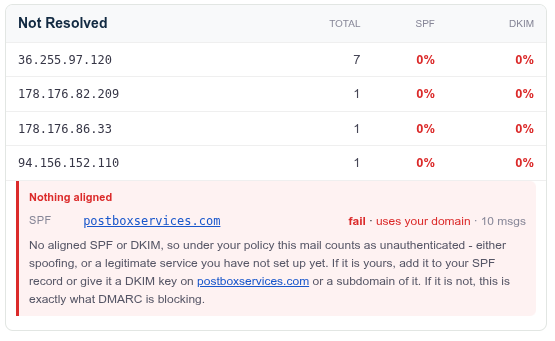
A closer look at those four sources: none of them has any reverse DNS. That absence is itself a fingerprint - legitimate mail servers have forward-confirmed reverse DNS as table stakes, so a source with no PTR record is almost never legitimate production mail infrastructure. Two of the four sit inside mobile-carrier address space - consistent with traffic from end-user or dynamically assigned networks rather than conventional mail infrastructure, though that alone does not prove the machines are compromised. Machines like these are borrowed, which is exactly why chasing and blocking individual IPs is a losing game - and why domain-level policy is the defense that scales.
| Source IP | Reverse DNS (PTR) | Network (whois) |
|---|---|---|
36.255.97.120 | none | "Cyber-Security-PH" netblock, Philippines |
178.176.82.209 | none | Mobile-carrier NAT pool, Russia |
178.176.86.33 | none | Mobile-carrier NAT pool, Russia |
94.156.152.110 | none | Internet Magnate (Pty) Ltd, South Africa |
Under p=reject, that mail dies at the receiver's door. Under p=none - where a majority of domains that publish DMARC still sit, including the From domain in the replay case above - the domain requests no DMARC-based enforcement, and receivers commonly deliver mail that fails alignment. That is the entire argument for finishing the DMARC journey to enforcement, and it applies to every domain you own: campaign domains, bounce domains, parked domains and dormant brands are the ones attackers probe first, precisely because nobody is watching them. (The display-name phish in Attack 1 impersonated one of our campaign domains - which is now at p=reject too.)
The coverage matrix: which defense stops which attack
| Defense | 1. Display-name / lookalike | 2. Trusted-brand lure | 3. DKIM replay | 4. Exact-domain spoof |
|---|---|---|---|---|
| DMARC at p=reject | No effect | No effect (not your domain) | Aligned replays pass at any policy; unaligned ones (like our specimen) die at p=reject | Stops it |
| SPF/DKIM alone | No effect | No effect | Signature validates by design | Only with DMARC enforcing |
| BIMI + verified mark | Helps: real mail carries the logo | Only the impersonated brand can deploy it - its genuine mail then shows the logo, fakes arrive without it | No effect | Reinforces (needs DMARC) |
| Broad DKIM signing + oversigning | - | - | Limits what a replay can modify or inject; does not stop byte-for-byte replay to new recipients | - |
| DMARC report monitoring | Sees your-domain abuse only | No visibility | Surfaces as failing sources | Surfaces attempts seen by reporting receivers |
| Lookalike/registration monitoring | The defense | Partial | - | - |
| Recipient training (read the address, read the headers) | Essential | Essential | Backstop | Backstop |
The takeaway the matrix makes obvious: no single row covers the board. A brand serious about impersonation needs DMARC at enforcement on every domain it owns, monitoring that actually gets read, oversigned DKIM at its ESPs, and people who check addresses before clicking.
What to do this week
- Inventory every domain you own - including campaign, bounce and parked domains - and get each one to DMARC enforcement. Attackers probe the neglected ones first; ours tried a campaign domain, not the flagship.
- Check how spoofable you are right now: our free Spoofing & BEC exposure check reads your published records the way an attacker does.
- Turn on DMARC report monitoring so an attempt against your domain is something you see, not something you assume: our free weekly DMARC monitor, or learn what aggregate reports contain.
- Ask your ESP about oversigning if you send anything worth replaying (invoices, password resets, legal notices).
- Teach the one habit that defeats attacks 1 and 2: the display name is decoration; the address and the headers are the truth.
Impersonation is not a hypothetical for anyone - it reached an email-security consultancy's own inboxes four different ways in one week. The difference between a brand that gets hurt and one that shrugs it off is rarely luck; it is whether each of the four doors was closed in advance.
With thanks to lappuai.com, who kindly contributed part of the data analyzed for this article.
Frequently Asked Questions
What is brand impersonation in email?
Brand impersonation is any email attack where the message pretends to come from a brand the recipient trusts - a streaming service, a bank, DocuSign, a government agency, or your own company. It is not one technique but at least four: display-name and lookalike-domain impersonation (the visible name says the brand, the real address is something else), trusted-brand lures (borrowing a household brand's identity and template), DKIM replay (re-sending a genuinely signed message at scale), and exact-domain spoofing (forging the brand's real domain in the From header). Each is stopped by a different defense, which is why no single setting makes a brand safe.
Does DMARC stop brand impersonation?
DMARC at p=reject fully stops one of the four attacks: exact-domain spoofing, where the forged mail claims your real domain in the From header. It also kills unaligned DKIM replays that depend on the From domain sitting at p=none, like the specimen in this article. It does nothing against lookalike domains or display-name impersonation (the attacker's mail authenticates fine for the attacker's own domain), nothing against lures borrowing other brands, and an aligned replay of a brand's own signed mail passes DMARC legitimately at any policy. DMARC is essential - it is just not sufficient, and every domain you own (including campaign and parked domains) needs it at enforcement.
What is a DKIM replay attack?
An attacker obtains one legitimately signed message - for example by receiving a real email into a mailbox they control - and re-sends that exact message to thousands of new recipients. The DKIM signature still validates, because DKIM signs the message content, not the delivery path or recipient list. Receivers see dkim=pass from the original signer. Sender-side mitigations are partial: broad header coverage plus oversigning (listing headers like To and Subject in the h= tag more times than they appear, per RFC 6376 section 5.4.2) stops an attacker modifying or injecting headers, but nothing in classic DKIM prevents re-sending the unchanged message to new envelope recipients. The x= expiry tag is explicitly NOT an anti-replay defense (RFC 6376 section 3.5); emerging recipient-binding schemes such as Google's darn tag and the proposed DKIM2 are the structural fixes.
How do I check if an email really came from the brand it claims?
Ignore the display name entirely - it is attacker-controlled free text. Look at the actual address after it, then at the message headers: Authentication-Results shows which domain actually passed SPF and DKIM, and whether DMARC passed for the domain shown in the From header. If the From says one brand but the authenticated domain is something unrelated, you are looking at impersonation - even if every check says pass. Our guide to reading email headers walks through it step by step.