Setup Guides · Google Workspace
Google Workspace DKIM Setup: the google._domainkey record and the Failures That Break It
Until you enable DKIM for your domain, Google signs your mail with its shared gappssmtp.com infrastructure domain - a valid signature that can never align with your real domain, so DMARC leans entirely on SPF, which breaks the moment anyone forwards your mail. The fix is one TXT record and one button. This guide covers the exact steps and the six failures we keep finding in audits.
Last updated 31 July 2026 · applies to all Google Workspace editions with Gmail
Why this matters (the gappssmtp trap)
Look at the headers of a message from a Workspace domain that never set up DKIM: there IS a DKIM signature, and it verifies. But its signing domain is something like yourdomain-com.20230601.gappssmtp.com - Google's shared pool - and DMARC does not care whether a signature verifies; it cares whether the signing domain aligns with your visible From domain. gappssmtp.com never aligns.
The consequence is identical to Microsoft 365's onmicrosoft.com trap: your DMARC passes ride on SPF alone, and any forwarded message - mailing lists, auto-forwards, helpdesk tools - breaks SPF and fails DMARC outright. This is the most common finding when we audit Workspace senders.
What you need
- A Google Workspace super-admin account (the Admin console at admin.google.com).
- Access to your domain's public DNS.
- New tenants: Gmail must have been enabled for 24-72 hours before the console will generate a DKIM key.
The setup, step by step
1 Open Gmail's authentication settings
In the Admin console go to Apps → Google Workspace → Gmail → Authenticate email, and pick your domain in the Selected domain menu.
2 Generate the DKIM key
Click Generate new record. Keep the defaults: 2048-bit key, selector google. The console shows the record to publish:
Host:   google._domainkey.yourdomain.com
Type:   TXT
Value:  v=DKIM1; k=rsa; p=MIIBIjANBgkqhkiG9w0BAQEFAAOCAQ8A...
        (one long key string)
If you get "DKIM record not created" on a new tenant, that is the 24-72 hour Gmail waiting period - not an error in your setup.
3 Publish the TXT record at your DNS host
At most hosts the record name is just google._domainkey - the host appends your domain. A 2048-bit value is longer than a single 255-character DNS string: most hosts accept it pasted whole and split it internally; some need it entered as two quoted chunks. On Cloudflare, TXT records are DNS-only by nature - paste the whole value.
4 Click Start authentication
Back in Authenticate email, click Start authentication. If it reports the record is missing, the TXT has not propagated - wait and retry. Google says signing can take up to 48 hours to begin; in practice it is usually live within the hour once the record resolves.
5 Verify on a real message
Send a fresh email and check its headers: DKIM-Signature should show d=yourdomain.com; s=google. In Gmail, open the message → three-dot menu → Show original - the summary table shows the SPF, DKIM and DMARC verdicts at a glance:
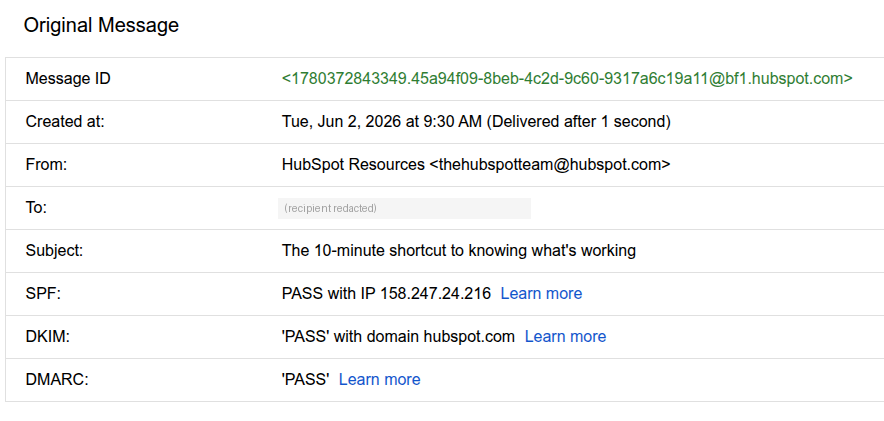
The fastest full check: send one email to Postbox Mailtester (Free Email Deliverability Audit) - it verifies the signature, the alignment, and the key size, and flags a gappssmtp-only signature immediately.
The six failures we keep finding
1. The record is published but Start authentication was never clicked
The most common one. The TXT record is perfect, but Google keeps signing with gappssmtp.com because signing was never activated. If headers still show d=...gappssmtp.com, go back to Authenticate email and click Start authentication.
2. The 2048-bit value did not survive your DNS host
Some hosts silently truncate long TXT values or reject them; the published record is then invalid and verification fails. Test it:
dig +short TXT google._domainkey.yourdomain.com
The output should be the complete key (possibly shown as two quoted strings - that is fine). If it is cut short, re-enter the value split into chunks per your host's docs, or regenerate as 1024-bit as a last resort.
3. Your registrar appended the domain twice
Pasting the full host into a field that auto-appends the domain creates google._domainkey.yourdomain.com.yourdomain.com. If the dig above returns nothing, query the doubled name - if that answers, shorten the record name to google._domainkey.
4. The key was regenerated and the old TXT is still published
Generate new record creates a new key under the same selector - the DNS record must be updated to match, or every message fails DKIM from that moment. If DKIM "suddenly broke", ask whether someone clicked Generate again.
5. Secondary and alias domains were never set up
DKIM is configured per domain. Each secondary domain and each alias domain your users send from needs its own key generated, published and activated - the primary domain's DKIM covers only itself.
6. Mail that does not go through Gmail is not covered
Workspace DKIM signs mail sent through Google. Your ESP campaigns, CRM sequences and transactional platforms sign (or fail to sign) separately - each needs its own DKIM on your domain. A DMARC report will show you every source; our free DMARC monitoring lists them in plain English weekly.
Verify it end to end
- One-email audit: send a message to Postbox Mailtester - signature, alignment, key size and the full deliverability picture.
- DNS check: look up selector
googlewith the free DKIM lookup. - Also on Microsoft 365? The same trap exists there with different mechanics - see the selector1/selector2 guide.
Frequently asked questions
What DKIM selector does Google Workspace use?
By default, google - the record lives at google._domainkey.yourdomain.com. A different selector can be chosen at generation time if that name is taken.
What is gappssmtp.com in my DKIM signature?
Google's shared signing domain, used until you enable custom DKIM. The signature is valid but never aligns with your domain - seeing d=...gappssmtp.com means your Workspace DKIM is not set up.
How long until it starts working?
New tenants wait 24-72 hours before a key can even be generated. After publishing the TXT and clicking Start authentication, Google quotes up to 48 hours; usually it is live within the hour.
DKIM passes but DMARC still fails - why?
Alignment. A valid gappssmtp.com signature verifies but does not align with your From domain. Complete the custom-domain setup so d= becomes your domain.
1024-bit or 2048-bit?
2048 - and try entering it split into quoted chunks before concluding your DNS host cannot store it. 1024 is the fallback, not the default.
Primary reference: Google Workspace Admin Help - Set up DKIM. Note: Google moved its Workspace admin documentation to knowledge.workspace.google.com in 2026 - older guides link support.google.com URLs that now redirect. Also in Setup Guides: Google Workspace SPF · Google Workspace DMARC · Microsoft 365 DKIM.
Stuck, or want the whole domain checked in one pass?