What is APRF? Aggregate Performance Reporting, Explained Simply
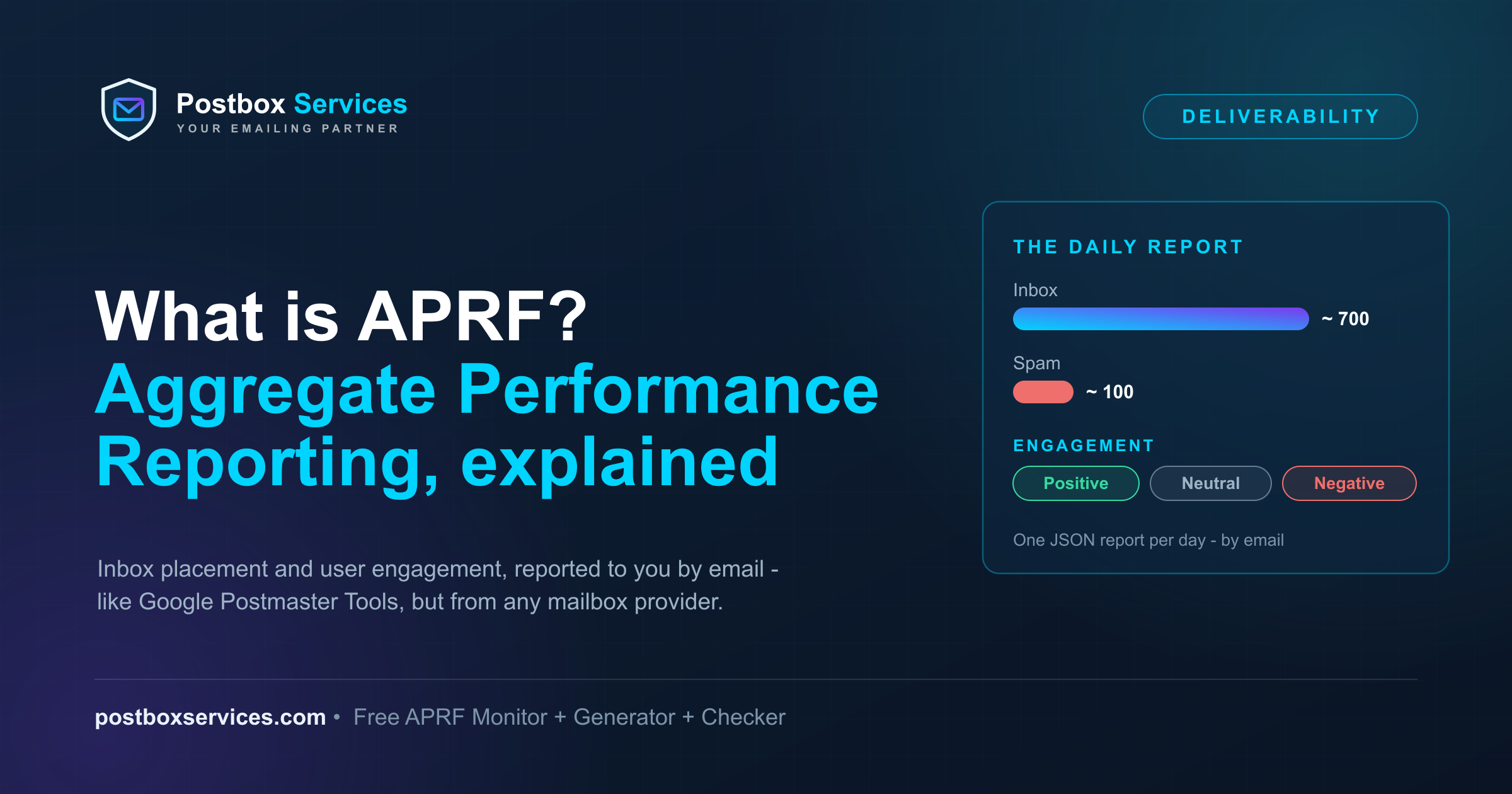
APRF (Aggregate Performance Reporting) is a proposed email standard that answers the question every sender asks and no standard has ever answered: once my mail was accepted, did it land in the inbox or in spam - and what did people do with it? You publish one DNS record, and mailbox providers that support APRF email you a daily report with placement and engagement data.
The simplest way to picture it: Google Postmaster Tools, but sent to you by email - and not just from Google. Instead of logging in to a separate dashboard for each mailbox provider, one standard report format arrives in a mailbox you control, from every provider that adopts the standard.
This guide explains what APRF is in plain language, how it compares to the reporting you already have, what the record and the reports look like, and how to set it up free in about five minutes.
Update, October 2026: APRF cleared its first real standards hurdle - the IETF MAILMAINT working group adopted it on 8 October 2026 and republished it as draft-ietf-mailmaint-aprf on 9 October. Nothing about setup changes, and records already published keep working. The details are in our adoption note; this guide reflects the working-group draft.
What is APRF?
APRF is an IETF Internet-Draft - now draft-ietf-mailmaint-aprf, adopted by the MAILMAINT working group in October 2026. It was first submitted in March 2026 as draft-brotman-aggregate-performance-reporting by Alex Brotman (Comcast), Tom Corbett (Iterable) and Emil Gustafsson, later joined by Julient Duplant (Google). If the name Brotman sounds familiar, it should: he co-authored TLS-RPT. APRF reuses the pattern that made DMARC and TLS-RPT work in practice:
- You publish a DNS record that says "send my reports here".
- Providers email you machine-readable reports - one JSON file per day. We built the free Postbox APRF Monitor to read those machine-readable reports for you and send a plain-English weekly digest instead.
No accounts, no dashboards, no API keys. The DNS record is the subscription.
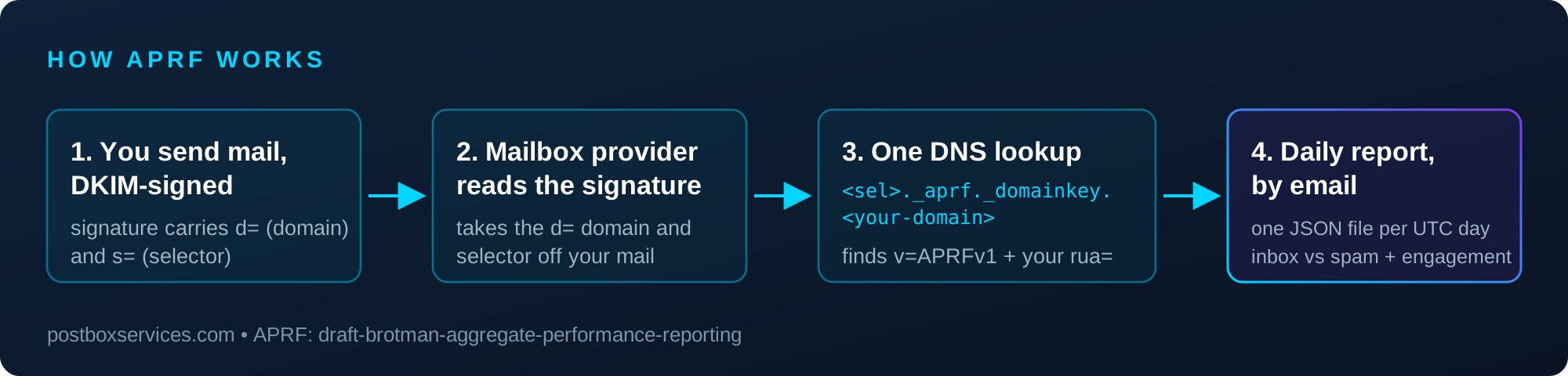
What is genuinely new is what gets reported. DMARC reports tell you whether mail authenticated. APRF reports tell you how mail performed:
- Placement - how many messages were filed to the inbox versus marked unwanted (spam).
- Engagement - what recipients did, bucketed as positive (opened it, clicked "not spam"), neutral, or negative (deleted it, complained).
That is data that has only ever lived behind per-provider portals or been estimated by seed-list tools. APRF is the first attempt to standardize it.
APRF vs Google Postmaster Tools (and everything else you have today)
Senders already have partial windows into placement. Each one has a gap that APRF is designed to close:
| Signal | What it shows | Coverage | How you get it |
|---|---|---|---|
| APRF (draft) | Inbox vs spam placement + real engagement | Any provider that adopts it | Emailed to you daily, one standard JSON format |
| Google Postmaster Tools | Spam rate, domain/IP reputation, auth rates | Gmail only | Log in to Google's dashboard |
| Microsoft SNDS | Spam rate, complaints, by sending IP | Outlook/Hotmail only | Log in to Microsoft's portal |
| DMARC aggregate reports | Authentication + alignment results | Broad (most large providers) | Emailed as XML |
| Seed-list tools | Estimated placement from test accounts | Panel-dependent | Paid dashboards |
Read the Postmaster row against the APRF row and the difference is exactly two things. Push versus pull: Postmaster data sits in a portal until you remember to check it; APRF arrives in your mailbox every day. One provider versus a standard: Postmaster Tools will only ever describe Gmail; an APRF record works for every provider that turns the standard on, in the same format, with no extra setup per provider.
And against seed-list tools the difference is honesty of the data itself: seed lists estimate placement from test addresses that receive your mail but never behave like customers. APRF reports what real recipients' mail actually did, aggregated by the provider that filed it.
How APRF works: the record
The design choice that surprises people: APRF is keyed to the DKIM signing domain (the d= in your DKIM signature), not the From address. When a provider wants to report on your mail, it takes the domain and selector off your DKIM signature and looks up a TXT record at:
<selector>._aprf._domainkey.<your-signing-domain>A minimal record is one line:
v=APRFv1; rua=mailto:[email protected]v=APRFv1 is mandatory, and rua= is the address reports go to - the same idea as DMARC's rua tag. To cover every selector with one record you have two options: a wildcard (*._aprf._domainkey.<signing-domain>), or - new in the working-group draft - a selector-less record at plain _aprf._domainkey.<signing-domain>. The draft defines the order of discovery when more than one form exists: the most specific match wins, so an exact-selector record beats the wildcard, and the wildcard beats the selector-less record. Until providers demonstrably support the newer selector-less lookup, the wildcard remains the conservative all-selectors choice.
One real-world gotcha: if your domain publishes an anti-spoofing null-key DKIM wildcard (a *._domainkey TXT with an empty p=), that wildcard also answers every _aprf._domainkey lookup - a checker or provider asking for your APRF record gets v=DKIM1 back instead of nothing. Nothing is broken, but to use APRF on such a domain, publish the *._aprf._domainkey wildcard form: it sits closer to the queried name, so it takes precedence over the DKIM wildcard.
Why the DKIM domain? Because it is a verified identity - the provider cryptographically knows who signed the mail. It also puts reports where they are most useful: a brand signing with its own domain gets reports for exactly the mail it signed, and an ESP signing with its domain can see performance across its platform.
The practical consequence: you need one record per signing domain, and there is no subdomain fallback. Many senders sign under several d= domains (your own plus ESP subdomains like em1234.yourdomain.com) - your DMARC aggregate reports list every one of them.
One more record matters when your reports go to a mailbox on a different domain than the signing domain - for example, a monitoring service. The destination has to consent to receive them, with its own TXT record published on the destination domain:
Host:   <selector>.<signing-domain>._aprf.<destination-domain>
Value:  v=APRFv1
A wildcard is allowed here too, so a destination can accept reports for any signer. (If you use our APRF Monitor, this consent record is already published on our side - you only publish the one record on your signing domain.)
What the reports look like
Reports arrive by email, one JSON file per UTC day, attached to a multipart/report message (gzip allowed). Each report names the reporting provider, your DKIM domain and selector, and the reporting window, then gives the classification and engagement numbers per segment.
One caveat to internalise before you build a spreadsheet on top of this: the numbers are buckets, not exact counts. To protect recipient privacy, the draft recommends that providers round values into ranges - and suggests reporting the upper bound of each bucket. So inbox: 700 means "no more than about 700", not "roughly 700". The bucket size is the provider's choice - the one public Comcast sample shows round-hundred values. Read the numbers as a ceiling and a trend line, not an audit total.
Segmenting your reports
By default a report aggregates everything signed by one domain and selector. If you send more than one kind of mail - say marketing and transactional, or several brands - you probably want the numbers broken out. The draft gives a signer three ways to do that, described in its deployment appendix:
- The
sdi=tag. Add a header to your mail (for exampleSigner-Info: brand1^promo), DKIM-sign it, and name it in your record with a separator character:sdi=Signer-Info,^. Providers that honour it split each report by that header's value, up to four parts deep. The separator must be a single printable character other than;,=or,- and keep the segment values generic, because they appear verbatim in reports. - A different signing domain per stream. Sign marketing with
mail.yourdomain.comand transactional withtxn.yourdomain.com, and each gets its own reports - many senders already separate streams this way for reputation reasons. - A different selector per stream. Same idea, one domain: each selector with its own record gets its own reports.
A note on expectations: segmentation is the least-proven part of the spec today - Comcast's beta does not segment yet, and the draft's own FAQ still discusses how sdi= should interact with promotional-versus-transactional splits. The domain and selector approaches work with any provider from day one, because they are just more records.
How to set up APRF (free, about five minutes)
- List your DKIM signing domains. Every
d=domain your mail signs with needs its own record. Your DMARC reports show the full list - our free DMARC Monitor surfaces it in plain English if you do not want to read XML. - The easy path: sign up for the free Postbox APRF Monitor. It hands you the exact TXT record to publish - nothing to write, no mailbox to build, no JSON to parse. Once the record is live, the Monitor receives the reports for you and emails a plain-English weekly digest, the same model as our DMARC Monitor. For most senders, this is the whole setup.
- Not looking to use our APRF Monitor? Generate the record yourself. The free Postbox APRF Record Generator builds the exact TXT record - host name and value - for your selector or as a wildcard, plus the consent record you need if your reporting mailbox lives on a different domain.
- Then publish, verify, and get ready to receive. Add the TXT record in your DNS panel and confirm it parses with the free Postbox APRF Record Checker - it catches the common mistakes (wrong host, missing
v=APRFv1, malformedrua) before a provider ever looks. Reports then arrive as JSON attachments your mailbox will need to collect, un-gzip and parse - remembering the values are buckets, not exact counts.
Where APRF stands right now - the honest version
APRF is early, and you should hear that clearly - but it is moving. On 8 October 2026 the IETF MAILMAINT working group adopted the draft, republishing it as draft-ietf-mailmaint-aprf the next day - so it is no longer one company's individual submission but a Standards Track proposal under formal working-group review, running to April 2027. It is still a draft, not a published RFC. And as of late 2026, Comcast is the only mailbox provider sending reports, in beta. Gmail, Microsoft, Yahoo and Apple have announced nothing - though a Google engineer among the draft's authors is a signal worth what it is.
So why act now? Because the cost is one TXT record and the payoff compounds. Publishing an APRF record today means your pipeline is proven on real Comcast data, and the day any larger provider flips the switch, your visibility starts immediately - no scramble, no backfill. That is exactly how the senders who adopted DMARC reporting early ended up years ahead of everyone else. For the deeper technical briefing - the full record grammar, off-domain consent records, and draft status as it evolves - see our APRF industry update.
What most APRF explainers get wrong
APRF is new enough that a wave of articles has appeared explaining it - and a surprising number never name the draft (draft-ietf-mailmaint-aprf since the October 2026 working-group adoption, draft-brotman-aggregate-performance-reporting before it), never mention that Comcast is the only provider actually sending reports, never show the v=APRFv1 record, and never mention the detail that changes your setup: reports are keyed to the DKIM signing domain, not the From address. Some describe metrics like bounce rate that are not in the draft at all.
If an APRF guide cannot tell you where the DNS record goes, it has not read the spec. The four facts above are the spec - everything else is commentary.
APRF will not guarantee you the inbox any more than a DMARC pass does. What it offers is the thing senders have wanted for twenty years: a standard, provider-neutral answer to "where did my mail actually go?" - delivered to you, by email, for free.
Frequently Asked Questions
What is APRF in email?
APRF (Aggregate Performance Reporting) is a proposed email standard that lets mailbox providers email senders a daily report showing how their mail performed - how much landed in the inbox versus spam, and how recipients reacted to it. You publish one DNS record saying where to send reports, and providers that support APRF email you the data as JSON. It works like DMARC reporting, but for performance instead of authentication.
Who created APRF?
APRF is an IETF Internet-Draft, now called draft-ietf-mailmaint-aprf after the MAILMAINT working group adopted it in October 2026. It was first submitted in March 2026 as draft-brotman-aggregate-performance-reporting by Alex Brotman of Comcast, Tom Corbett of Iterable and Emil Gustafsson, later joined by Julient Duplant of Google. Alex Brotman also co-authored TLS-RPT, so the pattern of DNS record plus emailed reports comes from a proven playbook.
Is APRF live? Which providers send APRF reports?
As of late 2026, Comcast is the only mailbox provider sending APRF reports, in beta, for mail to comcast.net recipients. Gmail, Microsoft, Yahoo and Apple have not announced support - though a Google engineer is among the draft's authors. The IETF MAILMAINT working group adopted the draft in October 2026, a real step toward standardization, but it is still a draft, not a published RFC.
What is the difference between APRF and DMARC reports?
DMARC aggregate reports tell you whether your mail passed authentication (SPF, DKIM, alignment) - they say nothing about where the message was filed. APRF reports tell you performance: inbox versus spam placement and recipient engagement. DMARC is keyed to the From domain and arrives as XML; APRF is keyed to the DKIM signing domain and arrives as JSON. They complement each other - most senders will want both.
How is APRF different from Google Postmaster Tools?
Google Postmaster Tools shows similar data - spam rate, reputation - but only for Gmail, only in Google's dashboard, and only if you log in to check it. APRF delivers placement and engagement data by email, in one standard format that any mailbox provider can adopt. Think of it as Postmaster-style data pushed to you instead of a per-provider portal you have to visit.
What does an APRF DNS record look like?
A minimal record is: v=APRFv1; rua=mailto:[email protected]. It is published as a TXT record at <selector>._aprf._domainkey.<signing-domain> - alongside your DKIM key, because APRF reports are filed under the DKIM signing domain. To cover all selectors at once you can publish a wildcard record (*._aprf._domainkey.<signing-domain>) or, since the October 2026 working-group draft, a selector-less record at plain _aprf._domainkey.<signing-domain>.
Why is APRF keyed to the DKIM signing domain instead of the From address?
Because the DKIM d= domain is a cryptographically verified identity - the provider knows for certain who signed the mail, even when the From address is a subdomain or an ESP's domain. It also means an ESP that signs with its own domain can receive reports covering its customers, and a brand signing with its own domain gets reports for exactly the mail it signed.
What is inside an APRF report?
One JSON file per UTC day, emailed as an attachment (optionally gzipped). It carries two families of data: classification - counts of mail filed to the inbox versus unwanted (spam) - and engagement - recipient actions bucketed as positive, neutral or negative, such as opens and not-spam clicks versus deletions and complaints.
Are APRF numbers exact counts?
No, and this matters. To protect recipient privacy the draft recommends bucketed values, reported as the upper bound of each bucket, with the bucket size chosen by each provider (the one public Comcast sample shows round-hundred values). An inbox value of 700 means at most about 700 messages, not exactly 700. Read APRF numbers as a ceiling and a trend over time, not as figures to compute a precise inbox-placement percentage from.
Do I need DMARC or DKIM before setting up APRF?
You need DKIM: APRF only works for signed mail, because the report is filed under the DKIM signing domain. You do not technically need DMARC, but your DMARC aggregate reports are the easiest way to discover every d= domain signing your mail - which is exactly the list of places an APRF record needs to go.
How do I set up APRF, and what does it cost?
Setup is free and takes minutes. The easiest route is a free monitor service like our Postbox APRF Monitor: it hands you the exact TXT record to publish, then receives the reports and emails you a plain-English weekly digest. If you would rather receive reports yourself, generate the record with a free APRF record generator, add the TXT record on each DKIM signing domain, verify it with a checker, and have a mailbox ready to collect and parse the JSON attachments.
Should I set up APRF now if only Comcast supports it?
Yes, if it costs you five minutes - which it does. The record is one TXT entry, there is no downside to publishing it, and you will start collecting real data from day one of any new provider turning APRF on. Early adopters of DMARC reporting had years of visibility before their competitors; APRF is the same opportunity at the same stage.