Email Domain Health Check: 8 Checks Every Domain Needs
Your emails are landing in spam, and everyone has a theory - your subject lines, your list, the phase of the moon. 🌙 But before any of that, there’s a layer most people never look at: the DNS records that tell Gmail, Outlook and Yahoo whether your domain is who it claims to be. Get these wrong and it doesn’t matter how good your email is - receivers were suspicious before they ever opened it.
An email domain health check runs the eight DNS checks that together decide whether your domain clears the bar every major inbox provider now sets. You can run all eight free in about three seconds with our Domain Health report - enter your domain and you’ll get a grade from A to F with a pass, warn or fail verdict on each item. The pattern that matters most: these eight checks fall into three tiers - hard requirements, strong signals, and nice-to-haves - and knowing which is which tells you what to fix first.
These are the same checks we run at the start of every deliverability engagement at Postbox Consultancy Services - because more often than not, the answer to “why are we in spam?” is sitting right here, before we ever look at content or sending behaviour. Here’s what every result means and what to do when one fails. 👇
📬 1. MX Records - Can Your Domain Receive Mail?
The first item in any email domain health check is MX. MX (Mail Exchange) records tell the world which servers accept email for your domain. Without them, nobody can email you - and receivers also treat a missing MX as a spam signal when you send, because legitimate businesses can receive replies.
Pass looks like: one or more mail servers listed by priority. Our MX lookup also resolves each server’s IP and identifies your provider - Google Workspace, Microsoft 365, Zoho and others.
If it fails: add MX records at your DNS host using the exact values your email provider documents. A five-minute fix with an outsized impact.
🛡️ 2. SPF - Who Is Allowed to Send as Your Domain?
SPF (Sender Policy Framework) is a TXT record listing every server authorised to send email using your domain. Receivers check the sending server against this list; mail from unlisted servers fails SPF.
The detail most people miss: SPF allows a maximum of 10 DNS lookups. Every include, a, mx and redirect mechanism consumes one - and the includes inside your includes count too. Go over 10 and SPF returns a PermError, which means it silently fails everywhere, even though the record looks fine at a glance. Our SPF checker counts lookups recursively and shows exactly which mechanisms consume them.
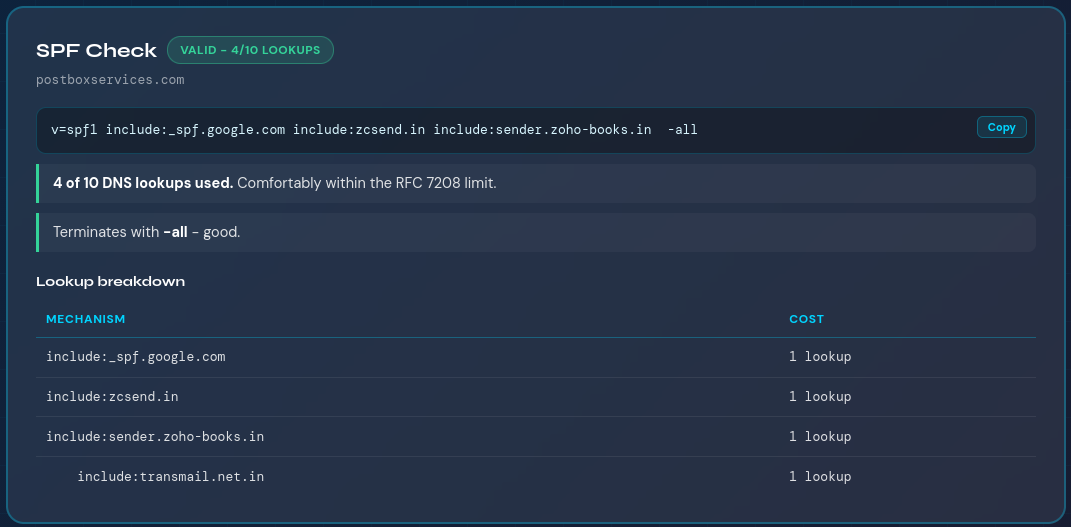
If it fails: publish a single SPF record (two is invalid), keep lookups under 10 by removing services you no longer use, and end the record with ~all or -all. Never use +all, which authorises the entire internet to send as you. ⚠️
✍️ 3. DKIM - Is Your Mail Cryptographically Signed?
DKIM (DomainKeys Identified Mail) adds a digital signature to every message you send and publishes the matching public key in your DNS. Receivers verify the signature to confirm the message really came from your domain and was not altered in transit.
Each sending platform uses its own selector - a name like google, selector1 or k1 that points to its key. If you don’t know yours, our DKIM lookup probes 15 common selectors automatically and grades the key strength it finds. (2048-bit is today’s standard; 1024-bit keys are considered weak.)
If it fails: enable DKIM signing in your email platform’s admin panel and publish the DNS record it gives you. Unsigned mail increasingly fails DMARC alignment at Gmail and Yahoo, so this is no longer optional for bulk senders.
🚦 4. DMARC - What Happens When Authentication Fails?
DMARC is the check that pulls the whole email domain health check together. It ties SPF and DKIM into one policy, tells receivers what to do with mail that fails authentication - deliver, quarantine or reject - and sends you reports about who is sending as your domain, including the spoofers.
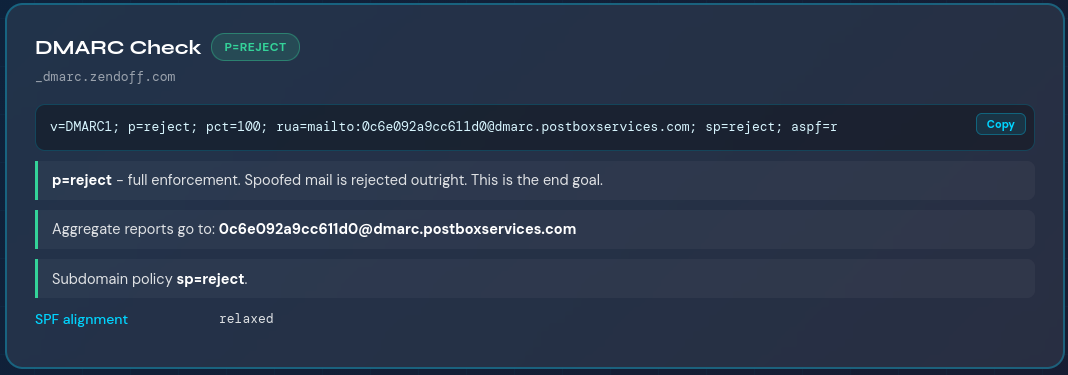
The policy progression matters: p=none is monitoring mode (spoofed mail still gets delivered), p=quarantine sends failures to spam, and p=reject blocks them outright. Gmail and Yahoo now require DMARC for bulk senders, so a missing record is a direct deliverability problem. Run the DMARC checker to see your policy parsed tag by tag with the exact next step.
If it fails: start with a monitoring record, collect reports for a few weeks, then tighten to quarantine and finally reject. The tool generates the starting record for you.
👉 Want the full picture on these three? Our complete SPF, DKIM and DMARC guide walks through modern email authentication in depth - how the three work together, the common misconfigurations, and how to move safely to full enforcement.
Need DMARC handled?
If you need free DMARC monitoring, use our Free DMARC Monitor - it collects your aggregate (rua) reports and emails a plain-English weekly digest of who is sending as your domain. And if you need paid consulting regarding DMARC, our deliverability team can take it end to end.
🔒 5. MTA-STS - Is Inbound Mail Forced Over Secure TLS?
MTA-STS (Mail Transfer Agent Strict Transport Security) tells sending servers they must deliver to your domain over verified, encrypted TLS - and must refuse to deliver if a secure connection can’t be made. It protects your inbound mail against downgrade and interception attacks.
It has two parts: a DNS record and a small policy file hosted on your domain. Our MTA-STS check verifies the DNS side instantly.
If it warns: a recommended upgrade rather than an emergency. Any business domain handling contracts, invoices or customer data should have it - most still don’t, which makes it an easy trust differentiator.
📊 6. TLS-RPT - Do You Hear About Encryption Failures?
TLS-RPT (TLS Reporting) is the companion to MTA-STS: a single TXT record telling receivers where to send a report when TLS delivery to your domain fails. Without it, encryption problems on your inbound mail go completely unreported.
If it warns: the fastest fix on the whole list - one TXT record with a reporting address, and the tool shows you the exact record to paste. ✅
🎨 7. BIMI - Does Your Logo Appear Next to Your Emails?
BIMI (Brand Indicators for Message Identification) displays your logo beside your messages in Gmail, Yahoo and Apple Mail. It’s part branding, part trust signal - and it only works once your authentication house is in order, because BIMI requires DMARC at quarantine or reject.
The requirements: an enforced DMARC policy, your logo as an SVG in a specific format, and for Gmail a Verified Mark Certificate. Our BIMI lookup checks your record and previews the published logo.
If it warns: treat BIMI as the reward for finishing checks 2 through 4, not a problem to fix. Optional, but free visibility in the inbox once you qualify.
🔐 8. DNSSEC - Are Your DNS Records Tamper-Proof?
DNSSEC cryptographically signs your DNS records so resolvers can verify they haven’t been forged. Every check above lives in DNS - SPF, DKIM, DMARC, MX - so DNSSEC is the layer that protects the protections. An attacker who can spoof your DNS answers can bypass everything else on this list.
If it shows info: enable DNSSEC at your DNS host if supported - at most providers it’s a single toggle. Not urgent, but cheap insurance.
🧮 How the Email Domain Health Check Score Works
The Domain Health report turns your email domain health check into a single grade by weighting each check by real-world impact: SPF and DMARC carry the most weight because they’re now hard requirements at major receivers, MX and DKIM follow closely, and MTA-STS, TLS-RPT, BIMI and DNSSEC round out the score as best-practice signals. An A means the fundamentals won’t be what holds your deliverability back. A C or below means authentication gaps are likely costing you inbox placement today.
One honest caveat: a perfect score doesn’t guarantee the inbox. 🎯 Domain health covers the DNS fundamentals - sender reputation, list quality, content and sending behaviour are the other half of the picture, and they’re exactly what a full deliverability audit examines.
🎯 Key Takeaways
- An email domain health check covers eight DNS-level checks: MX, SPF, DKIM, DMARC, MTA-STS, TLS-RPT, BIMI and DNSSEC - all runnable free in seconds.
- Fix in order of impact: MX if missing, then SPF, then DMARC, then DKIM. These are hard requirements at Gmail and Yahoo for bulk senders.
- MTA-STS, TLS-RPT, BIMI and DNSSEC are strong best-practice signals - most domains skip them, so they’re easy trust differentiators.
- The SPF 10-lookup limit is the most common silent failure: a record that looks fine can still return PermError and fail everywhere.
- A clean score is the entry ticket, not a guarantee - reputation, list quality and content decide placement once authentication passes.
👉 Not sure what your own Domain Health results are telling you - or which failures actually matter for your sending?
Book a Free Deliverability Consultation - fixing exactly this, for 500+ clients over 10+ years, is what we do. Or just run your free email domain health check now. 🚀