Gmail Spam Rate Above 0.3% in Postmaster Tools? Here's How to Fix It
You opened Google Postmaster Tools, looked at the User-reported spam rate chart, and saw it climb past 0.3%. Maybe delivery has already started slipping - opens down, more mail landing in the Spam tab, or campaigns that used to work quietly underperforming. The question every sender asks at this point is the same: can someone just fix this?
The honest answer is yes, it can be fixed - but not with a single setting. A spam rate above 0.3% is a symptom, and getting it back down means finding what is driving recipients to mark your mail as spam, removing that cause, and then giving your sender reputation time to recover. This guide walks through what the number means, how to diagnose it, and how long a realistic recovery takes.
What the 0.3% threshold actually is
Since February 2024, Google (alongside Yahoo) has enforced a set of email sender guidelines for bulk senders - anyone sending roughly 5,000 or more messages a day to Gmail addresses. Those requirements include aligned SPF and DKIM authentication, a DMARC record at p=none or stronger, one-click list unsubscribe (RFC 8058), and keeping your user-reported spam rate below 0.3% in Postmaster Tools. Google also recommends aiming below 0.1%.
Two things about that number matter:
- 0.3% is a ceiling, not a target. Google's own guidance is to never let the rate reach 0.3%. Sitting at 0.28% is not "passing" - it is one bad campaign away from trouble. Treat 0.1% as your working target.
- It measures human reactions. The rate is the number of messages recipients marked as spam divided by the number delivered to the inbox. It is not about spam filters catching you - it is about real people hitting the "Report spam" button. That is why you cannot fix it purely with DNS records.
Because it reflects recipient behaviour, a rate above 0.3% is Gmail telling you that a meaningful slice of the people you email do not want what you are sending, or do not recognise it. If you want the plain-English version of the other signals Postmaster now shows, we broke those down in Google Postmaster Tools: plain-language verdicts.
Step 1: Confirm what you are looking at
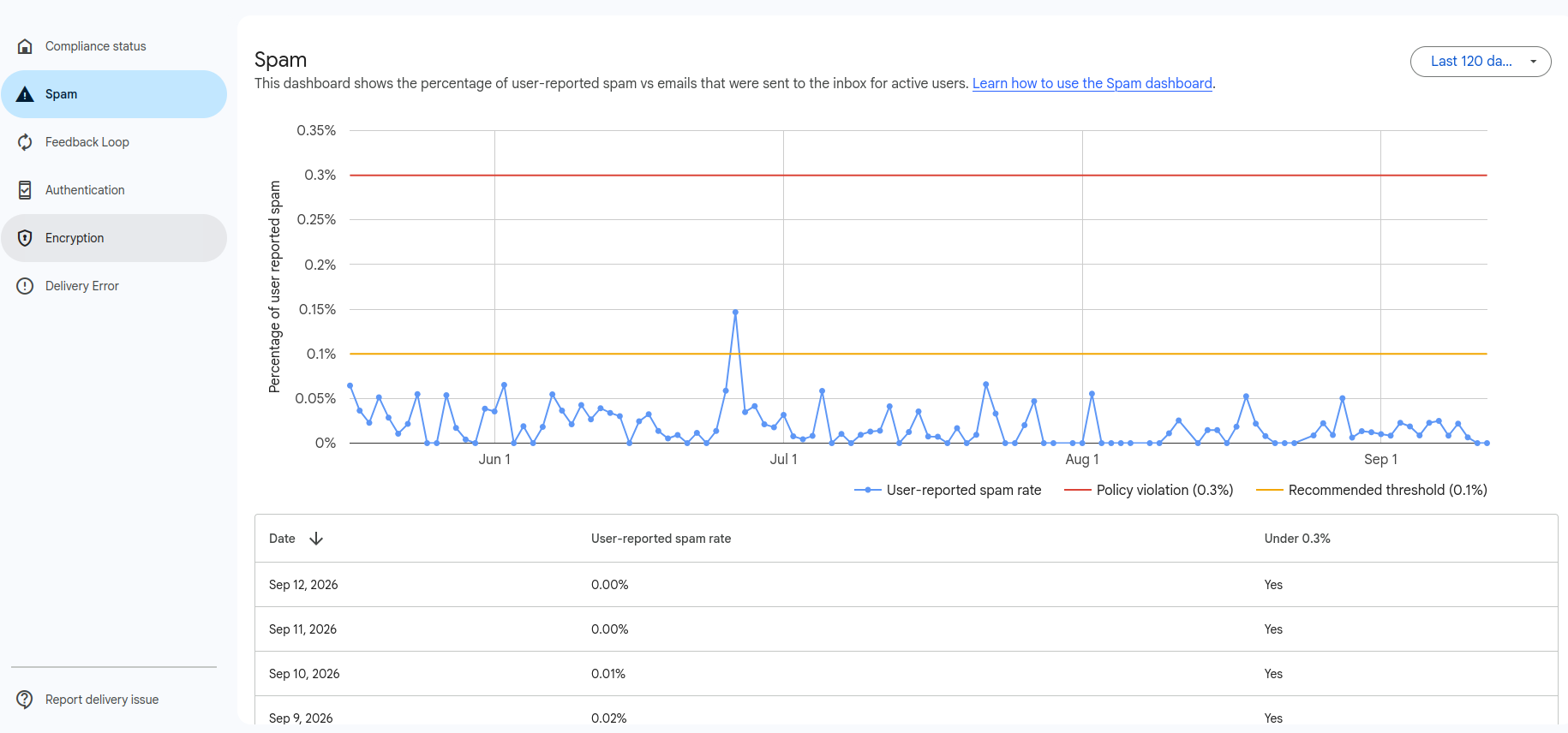
Before changing anything, read the chart correctly. In Postmaster Tools, the spam rate is shown per authenticating domain, and it only appears once you send enough volume for Google to report it - Google's dashboards guide explains each chart, including why low-volume days are hidden for privacy. Note whether the spike is:
- A single spike tied to one campaign or one day - usually a content, list or consent problem with that specific send.
- A sustained climb over weeks - usually a structural problem: list decay, over-mailing, or a stream you are not thinking about.
- Concentrated on one domain or subdomain - which tells you exactly where to look if you send marketing, transactional and cold mail from different domains.
Step 2: Find the cause
A spam rate above 0.3% almost always traces back to one or more of these, in rough order of how often we see them:
- Consent and list quality. Purchased lists, scraped addresses, old imports, or contacts who never clearly opted in generate complaints fast. Recipients who do not remember you are the ones who report you.
- Sending to unengaged recipients. Mailing people who have not opened in 6-12 months inflates complaints and depresses engagement, which Gmail also weighs.
- Hard-to-find or broken unsubscribe. If unsubscribing is harder than clicking "Report spam", people take the easier path. A missing or malformed one-click List-Unsubscribe header is a direct cause and a compliance failure.
- Content and expectation mismatch. Misleading subject lines, a sender name recipients do not recognise, or a sudden change in frequency or topic.
- Volume spikes. A large blast to a list that normally receives little mail spikes both complaints and filtering.
- Authentication and alignment gaps. Weak SPF/DKIM alignment or the absence of DMARC lets others send as you and muddies your reputation; it also means Postmaster may not attribute (or protect) your mail correctly.
This is exactly what a structured deliverability audit isolates - it separates the configuration issues from the list-and-content issues so you fix the right thing instead of guessing.
Step 3: Fix it
Once you know the cause, the fixes are concrete:
- Implement one-click unsubscribe properly. Add a working RFC 8058
List-UnsubscribeandList-Unsubscribe-Postheader so recipients can leave in one tap - and honour those requests immediately. This is both a complaint-reducer and a bulk-sender requirement. - Suppress and prune. Stop mailing unengaged segments. Sunset contacts who have not engaged in months, and remove role and stale addresses. Fewer, more-wanted sends beat large ones.
- Fix consent at the source. Move to confirmed opt-in for new contacts and stop importing lists you cannot vouch for.
- Segment by engagement. Send your most valuable, most-opened content to recent openers first while you rebuild trust.
- Confirm authentication. Ensure SPF and DKIM pass and align, and that DMARC is published at least at
p=noneso you can see every source sending as your domain. Our free DMARC monitor gives you that visibility with one DNS record. - Slow down. Reduce frequency and volume to your engaged core until the rate recovers, then scale back up gradually.
Complaint control is a discipline of its own - we keep a practical checklist in 6 strategies to control your spam complaint rates.
A realistic recovery timeline
This is where honest expectations matter. The Postmaster Tools spam rate is a trailing metric - it reflects recent complaint history, not the state of your list this minute. So even after you have removed the cause:
- Days: configuration fixes (unsubscribe header, authentication) take effect as soon as they are live and you send again.
- A few weeks: the rate itself falls as clean, low-complaint sends accumulate and dilute the recent bad history. Expect roughly two to six weeks of disciplined sending before the chart sits comfortably under 0.1%, assuming the underlying cause is genuinely gone.
- Longer: if Gmail has already down-weighted your domain reputation, inbox placement lags behind the complaint rate and can take additional weeks of consistent sending to fully recover.
The temptation when delivery is hurting is to send more to make up the shortfall. That is the one move that reliably makes it worse. Recovery is built on sending less, to people who want it, consistently.
When to bring in help
If email is a revenue channel and your Gmail spam rate is above 0.3%, this is worth fixing properly rather than experimenting. A specialist can isolate the driving stream in days, correct consent, segmentation and unsubscribe handling, verify your authentication, and set the sending discipline that brings the number down and keeps it there.
That is the work we do every week. Postbox Consultancy Services starts with an audit to find the real cause, then fixes it and monitors the recovery - see our services or get in touch for a free review of your setup. If your spam rate is climbing, the sooner you diagnose it, the shorter the road back.
Frequently Asked Questions
What spam rate does Google actually require?
In its bulk-sender guidelines (in force since February 2024 for anyone sending roughly 5,000 or more messages a day to Gmail), Google tells senders to keep the user-reported spam rate in Postmaster Tools below 0.3%, and recommends staying under 0.1%. The 0.3% figure is a ceiling you should never reach, not a target - once you are at or above it, Gmail can start diverting mail to spam or throttling it. The rate is measured as messages recipients mark as spam divided by messages delivered to the inbox, so it reflects how real people react to your mail.
How long does it take to get the Gmail spam rate back down?
Configuration fixes - a working one-click unsubscribe, corrected authentication - take effect within days. But the Postmaster Tools spam rate is a trailing average, so the number itself falls only as new, clean sends dilute the recent complaint history. In practice, once the root cause is genuinely removed, expect a few weeks of consistently low complaints before the chart returns to a safe range, and longer if reputation was already damaged. There is no button that resets it overnight.
Can a consultant fix a Gmail spam-rate problem for us?
Yes. This is core deliverability work: isolating which sending stream drives the complaints, fixing consent, segmentation and unsubscribe handling, confirming SPF, DKIM and DMARC alignment, and then rebuilding sender reputation with disciplined sending. Postbox Consultancy Services treats a spam rate above 0.3% as an urgent, root-cause engagement rather than a dashboard tweak - start with a deliverability audit to find the cause before changing anything.