Mimecast vs Proofpoint vs Barracuda Email Continuity: How They Work, What They Cost, and a Build-Your-Own Option
When Microsoft 365 went down worldwide on 12 November 2026, searches for "Mimecast email continuity" and "Proofpoint email continuity" jumped more than tenfold on Google Trends. Businesses that had just lost a day of email wanted to know one thing: what would have kept us working?
Email continuity is the answer those products sell: a backup path that keeps your business receiving, reading and sending email while Microsoft 365 or your mail server is down, and then puts everything back into the normal mailboxes. This guide compares how the three best-known services, from Mimecast, Proofpoint and Barracuda, actually work, how long they hold your mail, what they cost, and how to build the same thing yourself. Every fact links to the vendor's own documentation, so you can check it.
How email continuity services work
All three follow the same pattern. Your domain's MX record points to the vendor's email gateway, which filters your mail and passes it on to Microsoft 365. The gateway also holds or copies mail, so when Microsoft 365 is unreachable it can keep it safe and give your staff an emergency inbox. When the outage ends, held mail is delivered and anything sent or received during the outage is synced back. The gateway itself must not become the weak point, so it runs in more than one location: two gateways, both listed as MX records, so that if one fails senders use the other. Both must be set up the same way and tested regularly; two MX records alone are not enough.
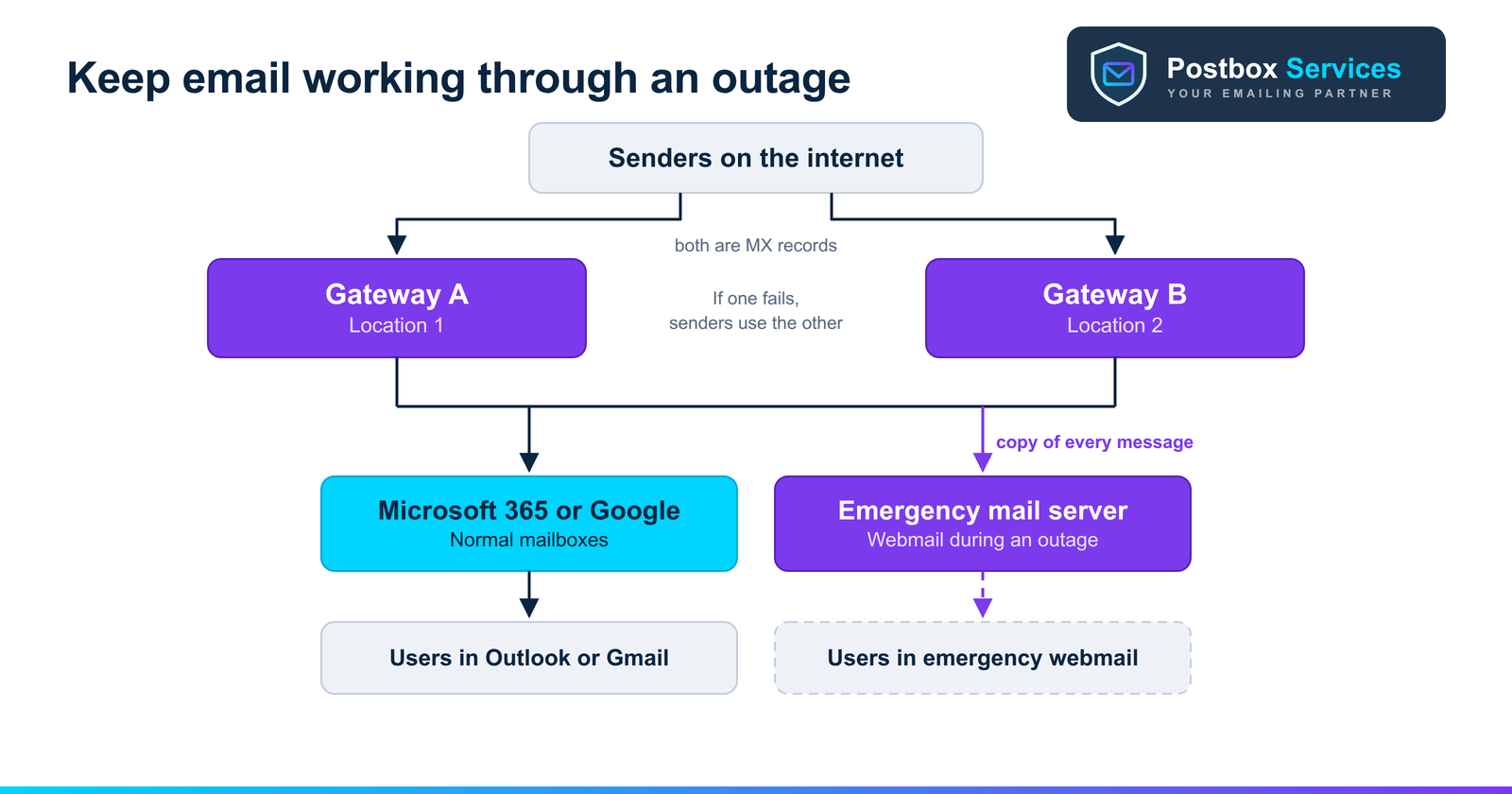
The differences are in the details: how the emergency mode switches on, how your staff reach their mail, how much past mail they can see, how long the vendor holds incoming mail, and which email platforms are covered.
Plan your next email outage with our free planner →
Mimecast email continuity
- Where it sits. Continuity is part of Mimecast's Pro tier, listed as "Email continuity (MX)", and is also in the Max tier. Your MX record points to Mimecast. Pricing for every tier is on request (Mimecast product tiers).
- How it switches on. An administrator can start a continuity event, a link in Mimecast's SMS or email alert can start it, or users can activate it themselves in Mimecast for Outlook (Mimecast: activating continuity mode). Mimecast's Continuity Monitor can also enable it automatically when it detects a disruption (Mimecast: Continuity Monitor).
- How staff work. In classic Outlook with the Mimecast add-in, Outlook goes into offline mode and mail is sent and received through Mimecast. The add-in's continuity options need Outlook in Cached Exchange Mode; otherwise staff use the Mimecast Personal Portal in a browser. There are also Mac and mobile apps.
- The new Outlook catch. Mimecast says that with the new Outlook, users must be told about the continuity event another way and use the Personal Portal, because the old add-in model no longer works (Mimecast: impact of the new Outlook).
- How long it holds mail. Inbound mail is queued for up to four days by default, which can be extended. For longer outages, deliveries can be paused so senders do not get bounces (Mimecast: continuity troubleshooting).
- Syncing back. By default, mail sent and received during the event is copied back to each user's mailbox once the platform is available again.
- Platforms. Mimecast's Continuity Monitor article states: "Mimecast Continuity is only available for Office 365 environments."
Proofpoint email continuity
Proofpoint sells continuity in two forms: Enterprise Continuity for larger organisations, and the Emergency Inbox in Proofpoint Essentials for small and mid-sized businesses.
- Enterprise Continuity. Proofpoint Enterprise Protection, its email gateway, copies each message bound for Microsoft 365 or Exchange into Enterprise Continuity. Failover and recovery are automatic, with no action from users or IT. Staff stay in Outlook or use a web client in any desktop or mobile browser, with the most recent 30 days of email available. When service returns, messages route back to each user's Inbox or Sent Items automatically. Pricing is through Proofpoint's account team (Proofpoint Enterprise Continuity datasheet).
- Essentials Emergency Inbox. It activates automatically when mail cannot be delivered. Staff open queued mail in a webmail client, and can read, reply, forward and write new messages from their usual address. Afterwards, mail sent or received through the Emergency Inbox is restored to the main system with its original headers (Proofpoint Essentials Emergency Inbox datasheet).
- What Essentials costs. Proofpoint's published Essentials price list shows the Business package, which includes "30 days of Emergency Inbox", at a suggested $2.75 per active user per month, alongside spam and virus filtering. Note that this list is dated October 2021 (Proofpoint Essentials US price list), so check current pricing with a Proofpoint partner.
Barracuda email continuity
- Where it sits. Email Continuity is part of Barracuda Email Protection (Email Gateway Defense) and is included in all three plans: Advanced, Premium and Premium Plus (Barracuda Email Protection plans).
- How it switches on. An administrator turns on spooling for each domain and sets Email Continuity to "Auto-Enable". When Barracuda sees your mail server is offline, spooling starts at once and Email Continuity starts 10 minutes later. Once your server is back and mail is flowing, it stays on for up to an hour; it switches itself off when no spooled messages arrive for 15 minutes, and is automatically disabled after 96 hours (Barracuda: Email Continuity documentation).
- How staff work. Users work in Barracuda's message log: they can read, compose, reply, forward and download messages, and mail sent there goes out from their primary address. Messages remain viewable for 30 days. If your logins depend on LDAP and that server is also down, users cannot sign in.
- Syncing back. The original headers and timestamps of mail sent and received during the outage are synchronised to the main mail server.
- What it costs. Barracuda's site gives prices through a quote builder. On AWS Marketplace, Barracuda's Advanced Email Protection Bundle is listed at $6.70 per user per month on a one-month contract (AWS Marketplace: Barracuda Advanced Email Protection Bundle). Annual and private-offer pricing is usually lower.
Side-by-side comparison
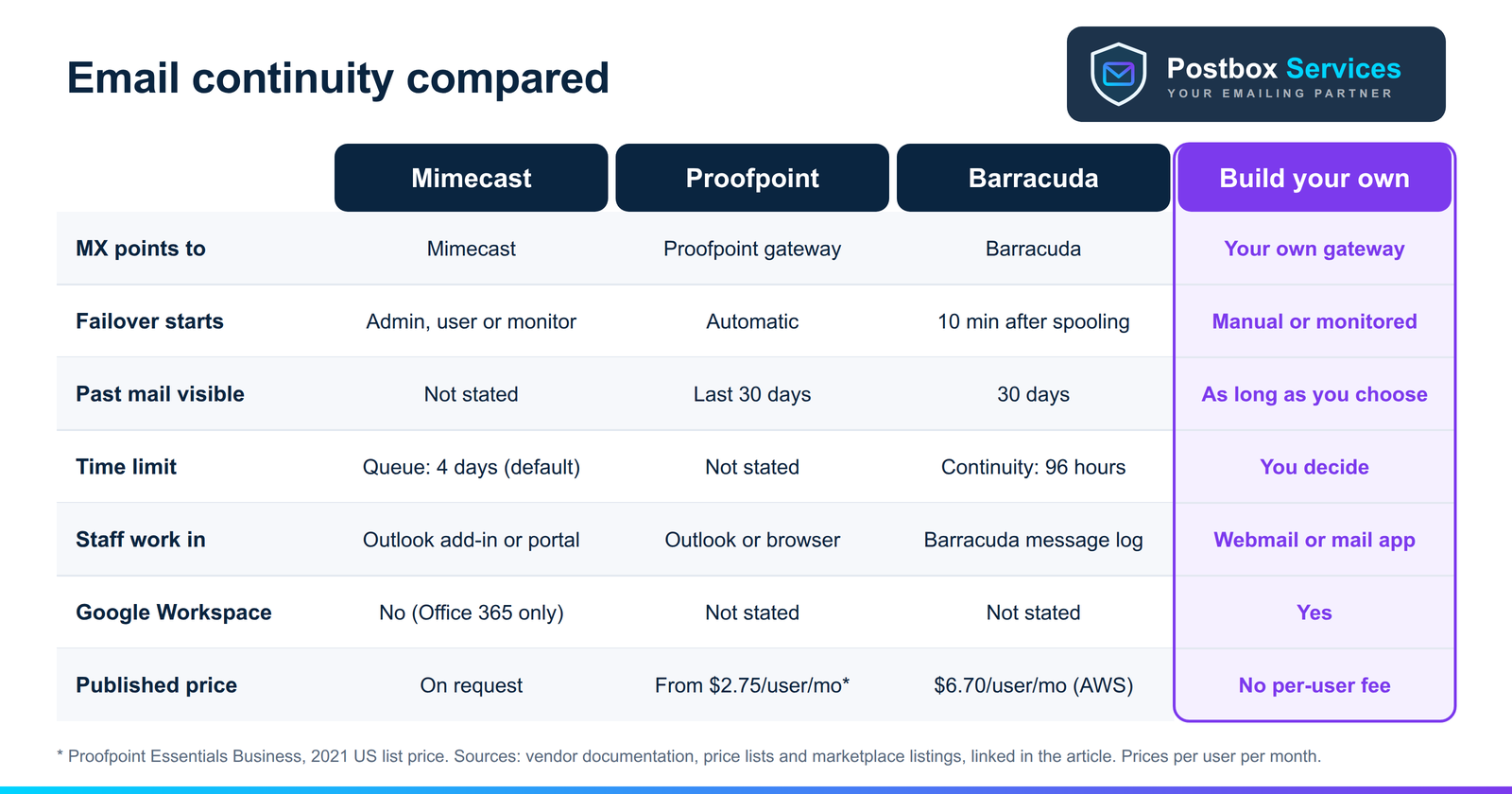
| Mimecast | Proofpoint | Barracuda | Build your own | |
|---|---|---|---|---|
| MX points to | Mimecast | Proofpoint gateway | Barracuda | Your own gateway |
| How failover starts | Admin, alert link, user, or Continuity Monitor | Automatic | Automatic, 10 min after spooling | Your choice: manual or monitored |
| How staff work | Outlook add-in (Cached Mode) or web portal | Outlook or browser (Enterprise); webmail (Essentials) | Barracuda message log | Webmail or any mail app |
| Past mail staff can see | Not stated | Last 30 days (Enterprise) | 30 days in the message list | As long as you choose |
| Incoming mail queued for | Up to 4 days by default, extendable | Not stated | Not stated | Set by you |
| Continuity mode limit | Not stated | Not stated | 96 hours | None |
| Sync back | Copied back to mailboxes | Routed to Inbox and Sent Items | Headers and timestamps synced | IMAP with OAuth, Gmail API or migration tools |
| Microsoft 365 | Yes | Yes | Yes | Yes |
| Google Workspace | Not for continuity (Office 365 only) | Not stated | Not stated | Yes |
| Published price | On request | Essentials from $2.75/user/month (2021 list) | $6.70/user/month (AWS, monthly) | No per-user fee (see below) |
"Not stated" means we could not find it in the vendor's public documentation. Ask the vendor before you rely on it.
What email continuity costs
The three vendors sell continuity inside a wider email security bundle (spam and virus filtering, phishing protection, encryption), so you pay per user per month for the whole bundle, not just the continuity part. To give a rough idea for a 50-person business, here are the published bundle prices from above. They are for illustration only: the bundles differ, so these are not like-for-like continuity quotes.
- Proofpoint Essentials Business: 50 × $2.75 = about $138 per month at the 2021 list price.
- Barracuda Advanced (AWS Marketplace, monthly): 50 × $6.70 = about $335 per month.
- Mimecast Pro: on request.
Building your own has no per-user fee. You pay for servers and storage, which grow slowly with your mail volume and with how long you keep copies:
- Servers: two small gateway servers and one emergency mail server. Entry-level cloud servers start at about €6 a month at Hetzner or $12 a month at DigitalOcean; the emergency server needs enough disk for your rolling copy of mail.
- Software: Proxmox Mail Gateway, Postfix, Rspamd, mailcow and iRedMail are free to use. Optional paid support exists: Proxmox Mail Gateway subscriptions start at €190 per host per year (Proxmox pricing), mailcow support from €45.90 a month (Servercow), and the iRedAdmin-Pro admin panel from $499 a year (iRedMail pricing).
- Sending during an outage: relaying emergency replies through an established service such as Amazon SES costs $0.10 per 1,000 emails (Amazon SES pricing).
- The real cost is people: design, setup, monitoring, updates and regular outage drills. That is the trade-off for no per-user fees and full control of your data.
The build-your-own option
The same pattern the vendors use can be built with open-source software on your own servers or cloud account: Proxmox Mail Gateway, or Postfix with Rspamd, as the gateway; mailcow or iRedMail as the emergency mail server; and a sync job that copies replies back afterwards. It suits:
- Google Workspace users, because Google's inbound gateway setting supports a gateway in front, while Mimecast documents its continuity for Office 365 only and Proofpoint's Enterprise Continuity datasheet is written for Microsoft 365 and Exchange.
- Small and mid-sized businesses that want continuity without a per-user security bundle.
- Teams that want control of where their mail copies live and how long they are kept.
The catch is that you, or a partner, run it. We cover the full design, including two gateways, pre-set sending, mailbox mapping and sync-back, in our email continuity guide.
Which should you choose?
- Already a Mimecast, Proofpoint or Barracuda customer? Check whether continuity is in your plan before buying anything new. With Barracuda it is in every Email Protection plan; with Mimecast it is in Pro and Max.
- Microsoft 365 business that wants everything managed? Proofpoint Enterprise Continuity's automatic failover and 30 days of mail make it the most hands-off of the three, at enterprise pricing.
- Small business on Microsoft 365? Proofpoint Essentials or Barracuda give continuity as part of an affordable security bundle.
- On Google Workspace, or want to own your setup? Build your own, or confirm current Google Workspace support with the vendor first.
Not sure where you stand today? Our free email outage plan builder shows your gaps and gives you a step-by-step plan for the next outage.
🎯 Key Takeaways
- Mimecast, Proofpoint and Barracuda all put a gateway in front of your mailboxes and give staff an emergency inbox during an outage.
- Mimecast holds inbound mail for four days by default and its continuity is documented for Office 365 only; the new Outlook means staff use its web portal.
- Proofpoint Enterprise Continuity fails over automatically with 30 days of mail; Essentials includes a 30-day Emergency Inbox from $2.75 per user per month (2021 list price).
- Barracuda starts continuity 10 minutes after spooling, keeps it running for up to 96 hours, and is in every Email Protection plan.
- Building your own with open-source software works for Microsoft 365 and Google Workspace without a per-user fee, if you are ready to run it.
Not sure which continuity option fits your business?
We help businesses choose and set up email continuity, from configuring a vendor service properly to building an open-source gateway and emergency mail server you own.
Book a free consultation Read the full continuity guideFrequently Asked Questions
What is email continuity?
Email continuity is a backup way to keep receiving, reading and sending business email when your main email service, such as Microsoft 365 or Google Workspace, is down. A gateway in front of your mailboxes holds or copies incoming mail, staff use an emergency inbox during the outage, and mail is synced back to the normal mailboxes afterwards.
Does Mimecast email continuity work with Google Workspace?
Mimecast's own Continuity Monitor documentation says Mimecast Continuity is only available for Office 365 environments. If you use Google Workspace, check with Mimecast directly, or consider a build-your-own setup using Google's inbound gateway setting.
How long does Mimecast hold email during an outage?
Mimecast's troubleshooting documentation says inbound email is automatically queued for a maximum of four days by default, which can be extended. For longer outages, inbound deliveries can be paused so senders do not receive bounces.
How many days of email does Proofpoint continuity keep?
Proofpoint's Enterprise Continuity datasheet says users have the most recent 30 days of email available. Proofpoint Essentials includes 30 days of Emergency Inbox in its Business package, according to Proofpoint's Essentials price list.
How long does Barracuda email continuity last?
Barracuda's documentation says Email Continuity starts 10 minutes after spooling begins and is automatically disabled after 96 hours. Messages remain viewable in the message list for 30 days.
Is there an open-source alternative to Mimecast or Proofpoint continuity?
Yes. The same pattern can be built with open-source software: Proxmox Mail Gateway or Postfix with Rspamd as the gateway, and mailcow or iRedMail as the emergency mail server. It works with Microsoft 365 and Google Workspace, costs what the servers cost instead of a per-user fee, but you (or a partner) have to run it. Postbox Services can help you design and build this open-source setup.