Microsoft Email Deliverability: The Complete Debugging Guide (2026)
Deliverability to Microsoft is the hardest debugging problem in email. Google gives you Postmaster Tools dashboards; Yahoo publishes crisp sender rules; Microsoft gives you two entirely different filtering empires, terse bounce codes like 550 SC-004, headers full of unexplained abbreviations, and a support process that opens with a disclaimer that nothing is guaranteed. This guide is the field manual we wish existed: how to work out which Microsoft rejected you, decode exactly what its bounce and headers are saying, and fix the real cause - whether you send B2B cold email from Google Workspace or Microsoft 365 mailboxes, run newsletters through an ESP, or operate your own mail server. It covers Microsoft email deliverability end to end: fifteen bounce codes, the full header forensics, three escalation paths, and the 2026 sender requirements - verified against live captures throughout.
Everything here is sourced from Microsoft’s own documentation as of late July 2026 - which matters more than usual, because Microsoft quietly rebuilt its entire postmaster infrastructure this year: the old postmaster.live.com and sendersupport.olc.protection.outlook.com URLs now permanently redirect to a new portal, and SNDS dropped one of its most-watched metrics this month. Most articles you will find reference tooling that no longer exists in that form.
First fact: there are two Microsofts
Almost every Microsoft deliverability mystery starts with people debugging the wrong system. Under the hood Microsoft runs one filtering engine on a shared Exchange substrate - which is why you will see the same family of forensic headers in both worlds later in this guide - but on top of that engine sit two separate reputation-and-policy regimes, each with its own block lists, its own sender tools, and its own escalation paths. Your IP can be blocked at one and perfectly clean at the other:
- Consumer Outlook.com -
@outlook.com,@hotmail.com,@live.com,@msn.commailboxes. Microsoft’s own consumer reputation and block lists decide the verdict; the sender-facing tools are the Outlook.com Postmaster site, SNDS and JMRP; the bounce codes look likeSC-001,RP-003,DY-002,S3150. - Microsoft 365 / Exchange Online Protection (EOP) - every business domain hosted on Microsoft 365. Filtering is EOP plus (on higher licences) Defender for Office 365; the codes look like
5.7.606, the delisting flows are entirely different, and - the part with no consumer equivalent - each tenant’s admins can override Microsoft’s defaults with their own policies.
Which one did I hit? Check the recipient's MX.
Look up the recipient domain's MX record (our MX Lookup does this in a second). Business domains on Microsoft 365 resolve to <domain>.mail.protection.outlook.com - that's EOP, the business stack. The consumer domains resolve to *.olc.protection.outlook.com ("olc" = Outlook consumer). Same company, different filters, different debugging path - everything below is labelled accordingly.
For B2B cold email your recipients are overwhelmingly Microsoft 365 tenants, so EOP is your battlefield. Newsletters and B2C lists hit both.
Second fact: know which sender you are
Your debugging toolkit depends less on where mail lands than on where it leaves from. Three lanes:
Cold B2B outreach from real mailboxes. The sending IPs belong to Google or Microsoft and are shared with millions of senders - IP tools like SNDS are useless to you. Your reputation is your domain, your authentication alignment, and your sending behaviour. M365 senders have an extra failure mode: Microsoft can restrict you as an outbound spammer.
Mailchimp, Brevo, SendGrid, Klaviyo and friends own the IPs and feedback loops. You debug alignment (does the DKIM d= match your From domain?), bulk classification (Microsoft's BCL score exists precisely for your traffic), and list hygiene.
Postfix/Exim/iRedMail on your own IP. You own everything: PTR, IP reputation, throttling, SNDS, JMRP, delisting. The classic stack - and the only lane where the IP-level tools apply.
Step 1: read the bounce - the full decoder
The bounce (NDR) tells you which system fired and usually which class of problem you have. These are Microsoft’s own published meanings:
| Code | System | What Microsoft says it means | Your move |
|---|---|---|---|
550 SC-001 |
Outlook.com | Rejected for policy reasons - “content with spam-like characteristics or IP/domain reputation” | Fix content/reputation; if clean, request mitigation via sender support |
550 SC-002 |
Outlook.com | The IP “exhibited namespace mining behavior” (guessing addresses) | Stop verifying/guessing recipients against Outlook.com; clean your list |
550 SC-003 |
Outlook.com | “Your IP address appears to be an open proxy/relay” | Close the relay, then request delisting |
550 SC-004 |
Outlook.com | Block “because we have received complaints” | Enroll in JMRP, remove complainers, then request mitigation |
550 DY-001 |
Outlook.com | “We generally do not accept email from dynamic IP’s” | Send via a proper relay with static IP + PTR |
550 DY-002 |
Outlook.com | “Likely cause is a compromised or virus infected server” | Find the compromise first - delisting without fixing it re-blocks you |
550 OU-001 |
Outlook.com | Rejected via Spamhaus listing | Delist at Spamhaus, not at Microsoft |
550 OU-002 |
Outlook.com | Policy rejection - content or reputation | As SC-001 |
421 RP-001/002/003 |
Outlook.com | Rate/connection limit exceeded for your IP - reputation-based throttling | Slow down, warm up; deferred mail retries - do not blast harder |
550 5.7.1 ... (S3150) |
Outlook.com | “Part of their network is on our block list” - a range-level block, your IP is collateral | Your provider/host must engage Microsoft; changing IP within the same range rarely helps |
550 5.7.515 |
Outlook.com | Domain sends 5,000+/day and fails the SPF/DKIM/DMARC requirement | Fix authentication - see the requirements section below |
550 5.7.606-649 |
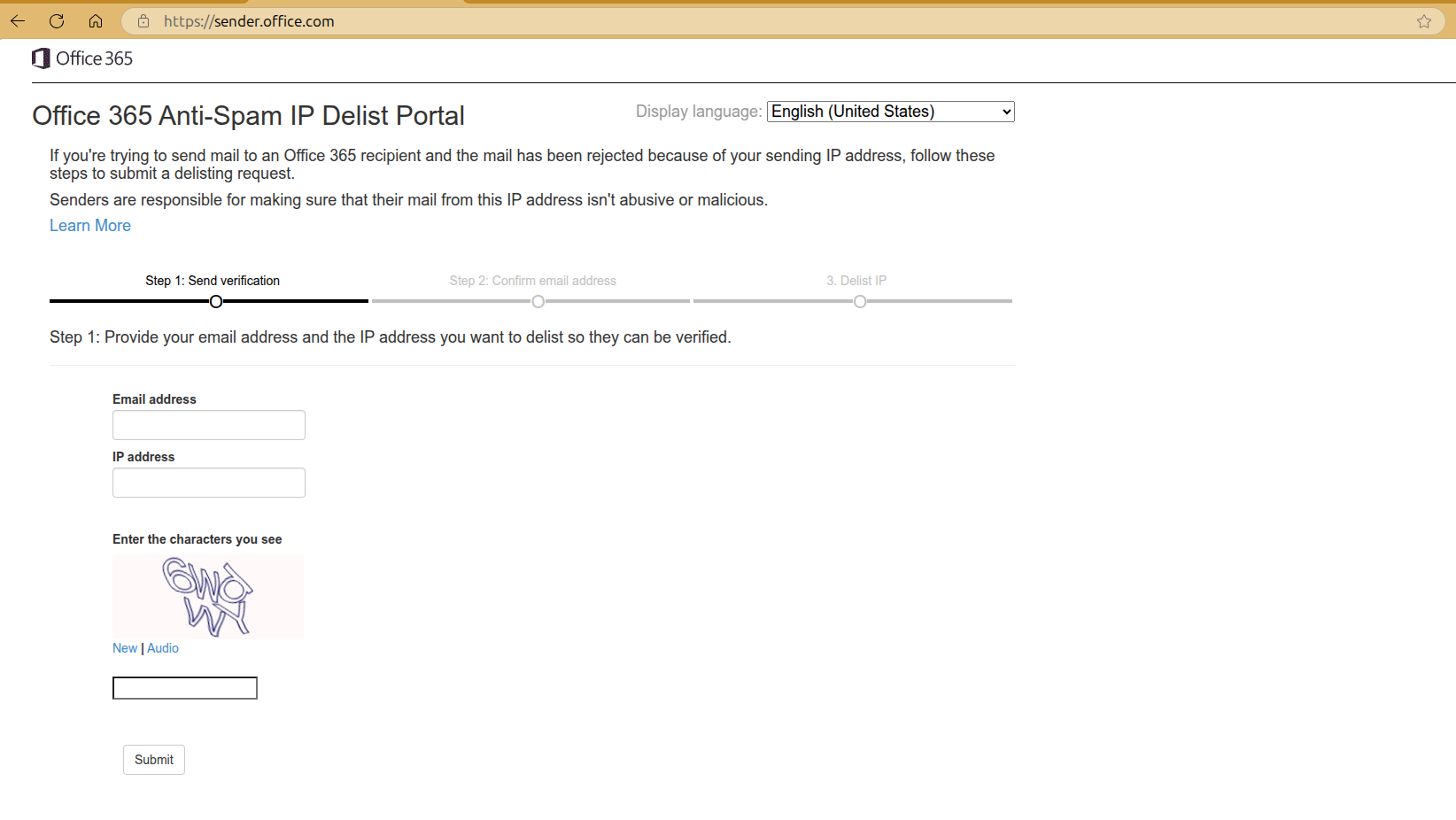
Microsoft 365 (EOP) | “Access denied, banned sending IP” | Self-service delist at sender.office.com |
550 5.7.511 |
Microsoft 365 (EOP) | Banned sender (not just IP) - the portal cannot fix this one | Email [email protected] with the full NDR; Microsoft says 48h to respond |
550 5.1.8 |
Microsoft 365 (outbound) | “Access denied, bad outbound sender” - your own mailbox is restricted for suspected spam | Your admin unblocks you at Restricted entities (Lane A - see below) |
550 5.7.236 |
Microsoft 365 (outbound) | onmicrosoft.com domains capped at 100 external recipients/day | Send from your real domain, never the tenant default |
Two nuances worth internalising. First, 421 codes are deferrals, not failures - Microsoft throttling an unwarmed IP or an unusual volume spike is normal, and well-behaved servers retry through it; panic-resending faster makes the reputation signal worse. Second, S3150 is the one consumer code with no official documentation page at all - the bounce text itself is the documentation, and because it is a range block, it is the one problem you mostly cannot fix yourself: the network owner has to.
Step 2: read the headers - what Microsoft really decided
When mail is accepted but junked, there is no bounce to read - Microsoft said 250 OK and your logs show a clean delivery. The verdict is written into the delivered message’s headers. Open the message in the recipient mailbox (Outlook web: three-dot menu, then View, then View message source) and find these headers.
A useful quirk of the two-Microsofts split - verified on live captures while writing this guide: consumer Outlook.com runs on the same Exchange substrate as Microsoft 365, and both stamp Authentication-Results (with compauth) and X-Microsoft-Antispam (with BCL). But the worksheets diverge from there. Business tenants get the full X-Forefront-Antispam-Report field dump (SFV, CAT, CIP, PTR, SCL). Consumer mailboxes, on current captures, do not carry that header at all - instead the SCL arrives in X-MS-Exchange-Organization-SCL, and a consumer-specific header, X-Microsoft-Antispam-Mailbox-Delivery, states the actual delivery decision outright. The scores mean the same things; the judge differs: in Microsoft 365, tenant anti-spam policies decide what an SCL or BCL becomes (the threshold tables below are those policy semantics), while a consumer mailbox applies Microsoft’s fixed filtering plus the user’s personal Safe and Blocked senders - no admin layer to configure or blame.
Authentication-Results and compauth
Authentication-Results: spf=pass (sender IP is 209.85.220.41)
  smtp.mailfrom=yourdomain.com; dkim=pass (signature was verified)
  header.d=yourdomain.com; dmarc=pass action=none
  header.from=yourdomain.com; compauth=pass reason=100
# compauth = Microsoft's COMPOSITE verdict: SPF + DKIM + DMARC + inference,
# evaluated against the From: domain your recipient actually sees.
compauth is Microsoft’s implicit-DMARC layer: even when a domain publishes no DMARC record, Microsoft computes its own authentication verdict. The reason codes are the diagnostic gold:
| compauth | reason | Meaning |
|---|---|---|
| fail | 000 |
Explicit DMARC failure with p=quarantine/reject |
| fail | 001 |
Implicit failure - no auth records, or only weak signals (SPF ~all, DMARC p=none) |
| fail | 010 |
DMARC fail with enforcing policy, and the From domain is one of the recipient tenant’s own domains (classic spoof of themselves) |
| fail | 601 |
The sending domain is one of the recipient org’s own accepted domains and implicit authentication failed - the classic intra-org spoof pattern |
| pass | 100-116 |
Passed explicitly or implicitly (aligned SPF/DKIM, or infrastructure-level inference) |
| pass | 130 |
A DMARC failure was overridden by a trusted ARC sealer the tenant configured |
| softpass | 2xx |
Weak infrastructure-based pass |
| none | 905 |
Bypassed - complex routing (mail relayed via another service before Microsoft) |
One subtlety worth knowing: Microsoft currently publishes two partially different reason-code tables - the detailed one on the anti-spam message headers reference (which this table follows) and an abbreviated variant on the ARC configuration page that assigns some codes slightly different meanings. When they disagree, trust the message-headers reference - and the surrounding evidence in the header itself.
The single most common cold-email finding: compauth=fail reason=001. Translated: nothing about your setup proves you, so Microsoft guessed - and guessed against you. The fix is never a support ticket; it is aligned SPF and DKIM on your actual From domain plus a DMARC record, which moves you into the 1xx band. (If you want the full theory, see our guides to SPF and DMARC.)
The filtering worksheets: X-Forefront-Antispam-Report (Microsoft 365) and the consumer delivery header
X-Forefront-Antispam-Report: CIP:203.0.113.25;CTRY:US;LANG:en;
  IPV:NLI;SFV:SPM;H:mail.sender.example;PTR:mail.sender.example;
  CAT:SPM;SCL:6;SRV:BULK;DIR:INB;SFTY:9.25
# CIP  = connecting IP EOP saw          IPV:NLI = IP on no reputation list
# SFV  = filter verdict (SPM = spam)    CAT     = category applied
# SCL  = spam confidence level          SRV:BULK= classified as bulk (BCL met threshold)
# SFTY:9.25 = "first contact safety tip" shown - recipient rarely gets mail from you
The two numbers that decide the folder:
SCL - Spam Confidence Level. -1 skipped filtering (safe sender / allow list); 0-1 clean, inbox; 5-6 spam, Junk folder by default (quarantine under Strict preset); 7-9 high-confidence spam, Junk or quarantine depending on the tenant’s policy preset. Microsoft never stamps 2-4, and 7 usually comes from something other than the classifier - analyst grading, DMARC failure handling, or a tenant mail-flow rule.
BCL - Bulk Complaint Level (stamped in X-Microsoft-Antispam). This is the score built for ESP traffic: 0 = not a bulk sender, 1-3 = bulk with few complaints, 4-7 = mixed complaints, 8-9 = high complaints. The default tenant threshold is 7; the Standard security preset tightens it to 6, Strict to 5. If your newsletter shows BCL:7, you are being junked at default tenants - not because of anything in that one message, but because of the complaint history of the sending platform’s stream. That is an ESP-and-list problem, not a content problem.
And the verdicts worth recognising in SFV: SPM (filter said spam), BLK (the recipient personally blocked you - no authentication fix will help), SKB (tenant admin blocklisted your address/domain), SKA (tenant allowlisted you), SKN (a mail-flow rule marked you clean before filtering).
At a consumer mailbox the same verdict arrives in different clothes. This is from a real capture at a free Outlook.com address:
Authentication-Results: spf=pass ... dkim=pass ... dmarc=pass action=none
  header.from=yourdomain.com; compauth=pass reason=100
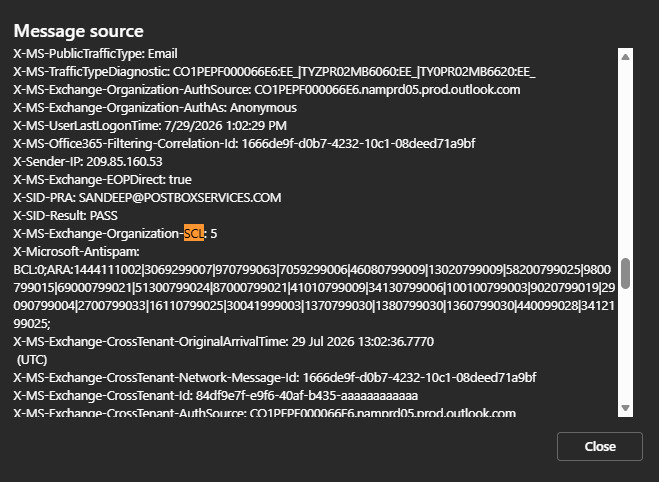
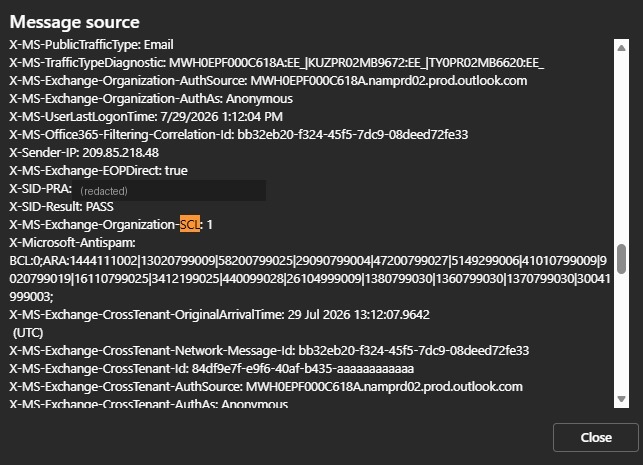
X-MS-Exchange-Organization-SCL: 5        # SCL lives HERE, not in a Forefront header
X-Microsoft-Antispam: BCL:0;ARA:...      # BCL, same as the business side
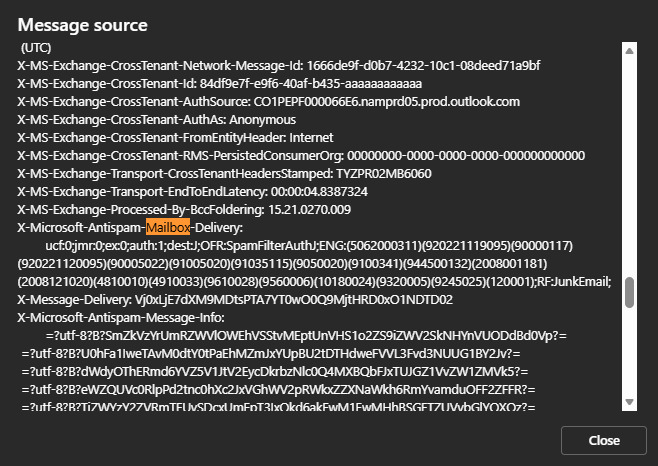
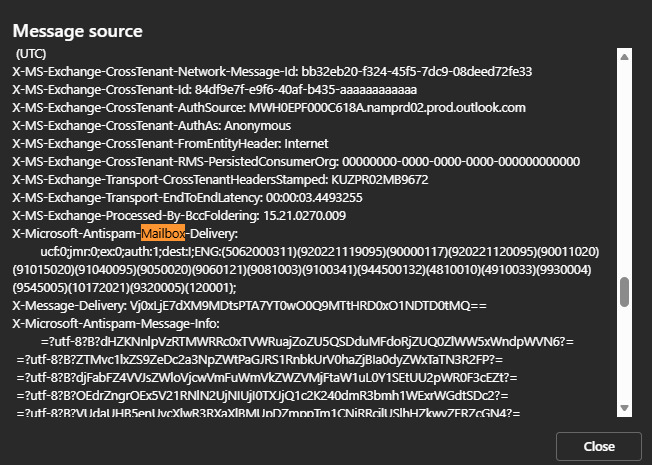
X-Microsoft-Antispam-Mailbox-Delivery:
  ucf:0;jmr:0;ex:0;auth:1;dest:J;OFR:SpamFilterAuthJ;...;RF:JunkEmail;
# dest:J = delivered to Junk (I = Inbox)  auth:1 = authenticated
# OFR/RF = the delivery decision and route - the header TELLS you the folder verdict
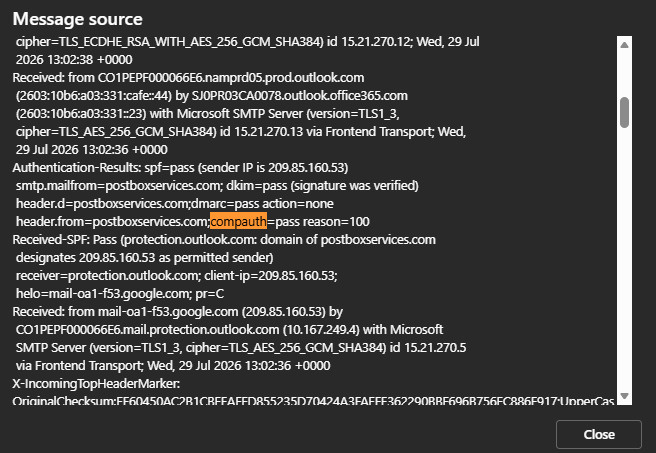
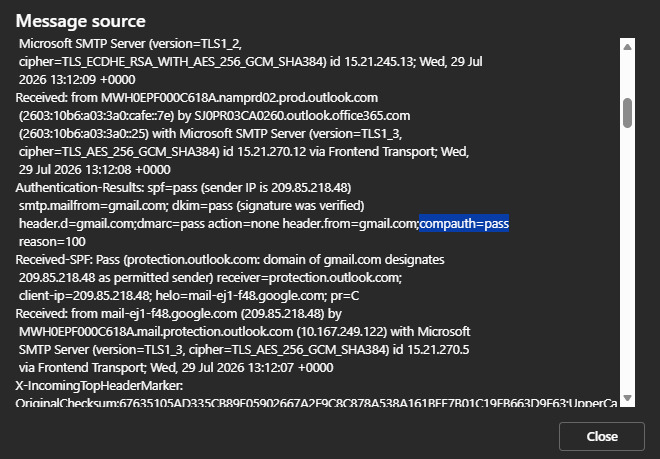
That capture deserves its own paragraphs, because the experiment behind it is the entire Microsoft lesson in two messages. While writing this guide we sent two test emails, minutes apart, to the same long-standing personal Outlook.com mailbox: one from our own business domain on Google Workspace, one from a personal @gmail.com address. The business domain was no stranger to Microsoft - it sends to Microsoft-hosted recipients in normal use - but this particular mailbox had no prior correspondence with it. Both messages therefore left the same Google sending infrastructure, and both landed compauth=pass reason=100:
- From our own business domain - SPF, DKIM and DMARC all passing, policy at
p=reject, the strictest possible authentication posture: SCL 5,dest:J- Junk. - From an ordinary personal @gmail.com address - DMARC
p=none, the weakest posture: SCL 1,dest:I- Inbox.
Identical infrastructure, identical composite-authentication verdict, opposite outcomes - and the strictly-authenticated sender lost. Authentication didn’t decide; reputation and history did. A personal @gmail.com address rides on a domain Microsoft’s filters process at enormous volume every day, while a low-volume business domain carries a thin reputation file - and although our domain was already known to Microsoft’s filters, this mailbox (years old, so no new-account filtering quirks to blame) had zero engagement history with it. Thin isn’t the same as bad, but at a mailbox that has never seen you, thin is enough for Junk. Authentication is the entry ticket, not the verdict; publishing p=reject protects your domain from spoofing, but it buys you no placement. Which is exactly why the intake checklist later in this guide treats a compauth pass as “stop blaming auth, look at behaviour.” One pair of messages is an illustration, not a dataset - but it is a test you can reproduce in five minutes against your own seed mailbox, and we’d encourage exactly that.
Here are both messages’ actual sources, captured via Outlook web’s View message source. First the junked message from our own domain:
And the message that inboxed, from the personal @gmail.com address, minutes later:
Tenant overrides: the verdict you cannot see from outside
In Microsoft 365, the recipient organisation's own anti-spam policies, mail-flow rules, and per-user Safe/Blocked senders run on top of Microsoft's verdict - SCL thresholds, quarantine-vs-junk routing, even outright allow/block, all vary per tenant. When one B2B prospect never sees your mail but ten others do, the odds are you are debugging their tenant's policy, not global reputation. The only reliable diagnosis on their side is an admin running a message trace (Exchange admin center, Mail flow, Message trace - it shows received/delivered/failed/quarantined per message) or checking quarantine at security.microsoft.com/quarantine. Spam-policy quarantine holds mail 15 days by default, then it is gone.
Step 3: fix by lane
Lane A - sending from Workspace or Microsoft 365 mailboxes (cold B2B)
Your sending IPs are Google’s or Microsoft’s and their reputation is not your problem - or your lever. What Microsoft’s filters evaluate about you is your domain and its behaviour:
- Authenticate the domain fully. Aligned SPF, DKIM with your domain’s own selector (not just the platform default), DMARC published. Target
compauth=pass reason=1xxin your own test headers - that one line is your pre-flight check. - Respect the platform’s real limits. Google Workspace: 2,000 messages/day per mailbox, 10,000 total recipients/day, and - the number that actually binds cold senders - 3,000 external recipients/day. Exchange Online: 10,000 recipients/day, 30 messages/minute per mailbox, plus a tenant-wide external-recipient cap (TERRL) sized to your licence count - trial tenants get just 5,000/day. Cold-email tooling that bursts past 30/min gets throttled by your own platform before Microsoft’s inbound filters ever see you. Microsoft’s own docs state it plainly: “Exchange Online isn’t suited to accommodate bulk-mailing scenarios.”
- Know the outbound tripwire. M365 watches its own senders. Cross its outbound-spam heuristics (volume spikes, complaint signals, suspected compromise) and your mailbox lands on the Restricted entities list: every send bounces with
550 5.1.8 Access denied, bad outbound senderuntil an admin unblocks you atsecurity.microsoft.com/restrictedentities(Defender portal, Email & collaboration, Review). Unblocking takes up to an hour, occasionally a day - and it will simply re-trigger unless the volume pattern changes. - Warm the domain, not an IP. New domains sending cold volume into EOP with no history are exactly what
reason=001plusSCL:5looks like. Ramp gradually, keep per-mailbox volume boring, spread across warmed mailboxes, and let replies accumulate - replies are the strongest positive behavioural signal a cold sender can earn.
Lane B - sending through an ESP
- Alignment first. Set up your ESP’s custom authentication so DKIM signs with
d=yourdomain.comand the SPF envelope aligns - not the ESP’s shared default domain. Without it, every Microsoft check lands on the ESP’s domain, you inherit the whole platform’s reputation, and your DMARC does nothing for you. - Watch BCL like ESP senders watch open rates. Seed a free Outlook.com address, mail it, read
X-Microsoft-Antispam. BCL 4+ on a clean seed message means the stream you share is complained about; a dedicated IP, or a better neighbourhood, is the fix. Microsoft’s own bulk-mail guidance recommends exactly what we tell clients: send bulk from a dedicated, authenticated subdomain (news.yourdomain.com) so its reputation is insulated from your transactional and 1:1 mail. - List hygiene is now enforcement, not etiquette. The complaint and bounce behaviour of your list is what feeds both BCL and the consumer-side complaint rate - and since 2025, the requirements below.
Lane C - your own server
Everything above applies, plus the IP layer is yours:
- Prerequisites before debugging anything: static IP, matching forward/reverse DNS (the
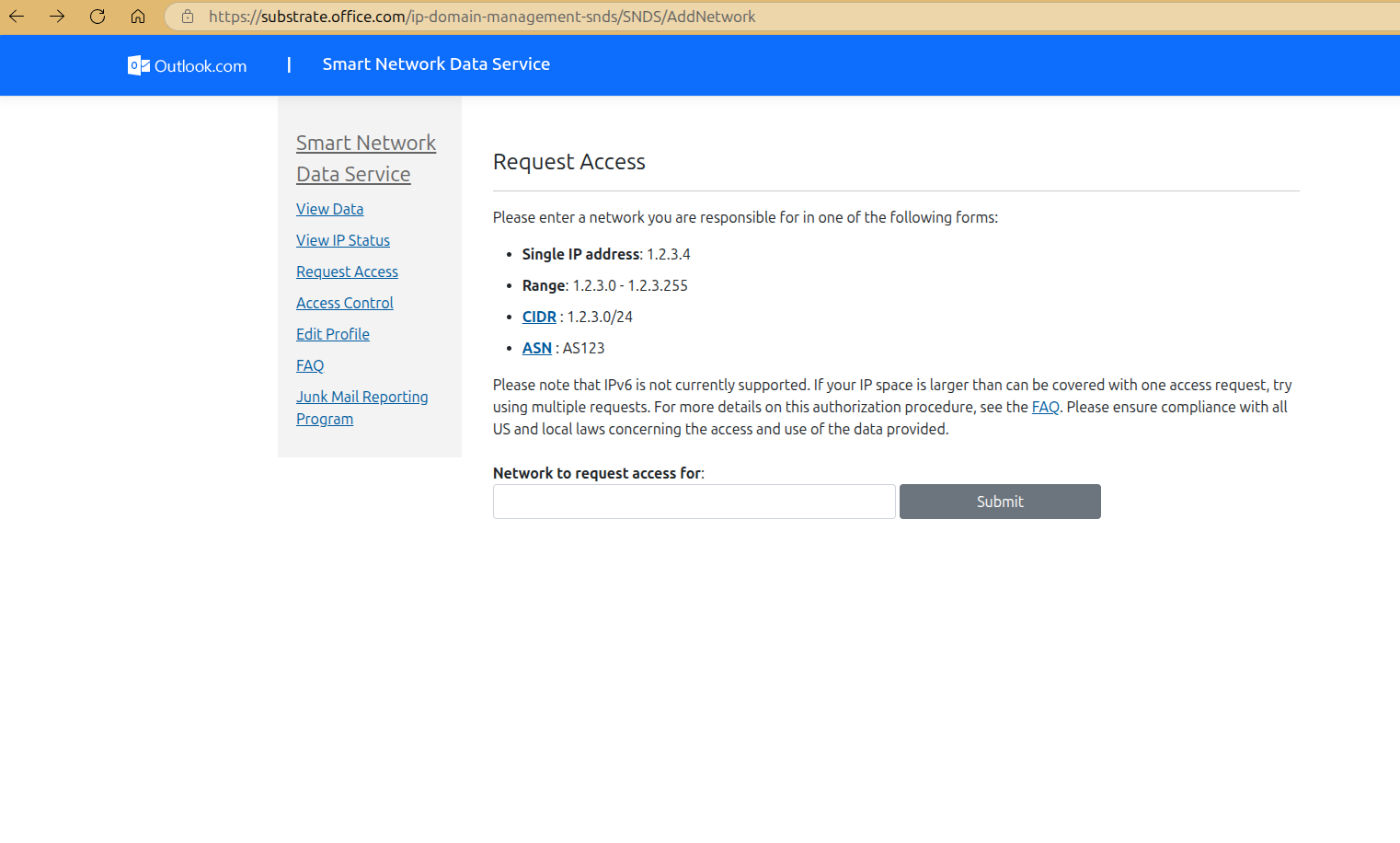
PTR:field in the header worksheet shows exactly what EOP saw), no open relay, and aligned SPF/DKIM/DMARC.DY-001andDY-002bounces mean Microsoft thinks your IP is dynamic or compromised - fix the infrastructure story before requesting anything. - Register for SNDS today - it is free and it is Microsoft’s only sender-facing telemetry. Enter your IP, range, or ASN; the authorisation mail goes to an address Microsoft considers authoritative for that network - and who that is has changed over time. Historically the offered addresses commonly included postmaster@/abuse@ of the IP’s reverse-DNS domain; on a live request while writing this guide (July 2026), SNDS offered only contacts from the IP block’s WHOIS/RDAP registration. For a rented VPS or cloud IP that means your hosting provider’s registrant/abuse addresses, not yours - expect to open a ticket asking the provider to approve or forward the authorization. Senders on their own delegated (SWIP’d) ranges are offered their own contacts. Data appears for any day your IP sends roughly 100+ messages, refreshes daily (about midnight PST), and is kept 90 days. The Filter result colours are published thresholds, not vibes: green means under 10% of your mail judged spam, yellow 10-90%, red over 90%. Microsoft’s long-standing benchmark for complaint rate: keep it under 0.3%.
- Enroll in JMRP (inside SNDS): Outlook.com sends you the full message every time a recipient clicks Junk, in ARF or RFC 2822 format, typically starting within 72 hours. Suppress every complainer immediately -
SC-004is what accumulated complaints look like when you did not. - Throttling is a phase, not a wall.
421 RP-00xon a young IP means send less, longer. Volume tolerance grows with sustained clean history.
2026 tooling changes worth knowing (most guides are already stale)
Microsoft rebuilt its consumer postmaster stack this year. postmaster.live.com and all sendersupport.olc.protection.outlook.com URLs now permanently redirect to a new portal under substrate.office.com; per the SNDS portal's own announcements, old automated SNDS access URLs were deprecated on June 22, 2026, and as of July 22, 2026, trap-hit counts no longer appear in the SNDS data report - the spam-trap column generations of postmasters watched is gone. Complaint rate and filter colour are now your primary consumer-side signals.
Getting unblocked: the three escalation paths
- EOP banned IP (
5.7.606-649): self-service at sender.office.com - enter the NDR recipient address and the blocked IP, confirm via email, click Delist. Microsoft says up to 24 hours or longer; if the underlying behaviour continues, the block returns.
- EOP banned sender (
5.7.511): the portal cannot clear this one - forward the full NDR to [email protected]; Microsoft commits to responding within 48 hours. - Consumer Outlook.com blocks (
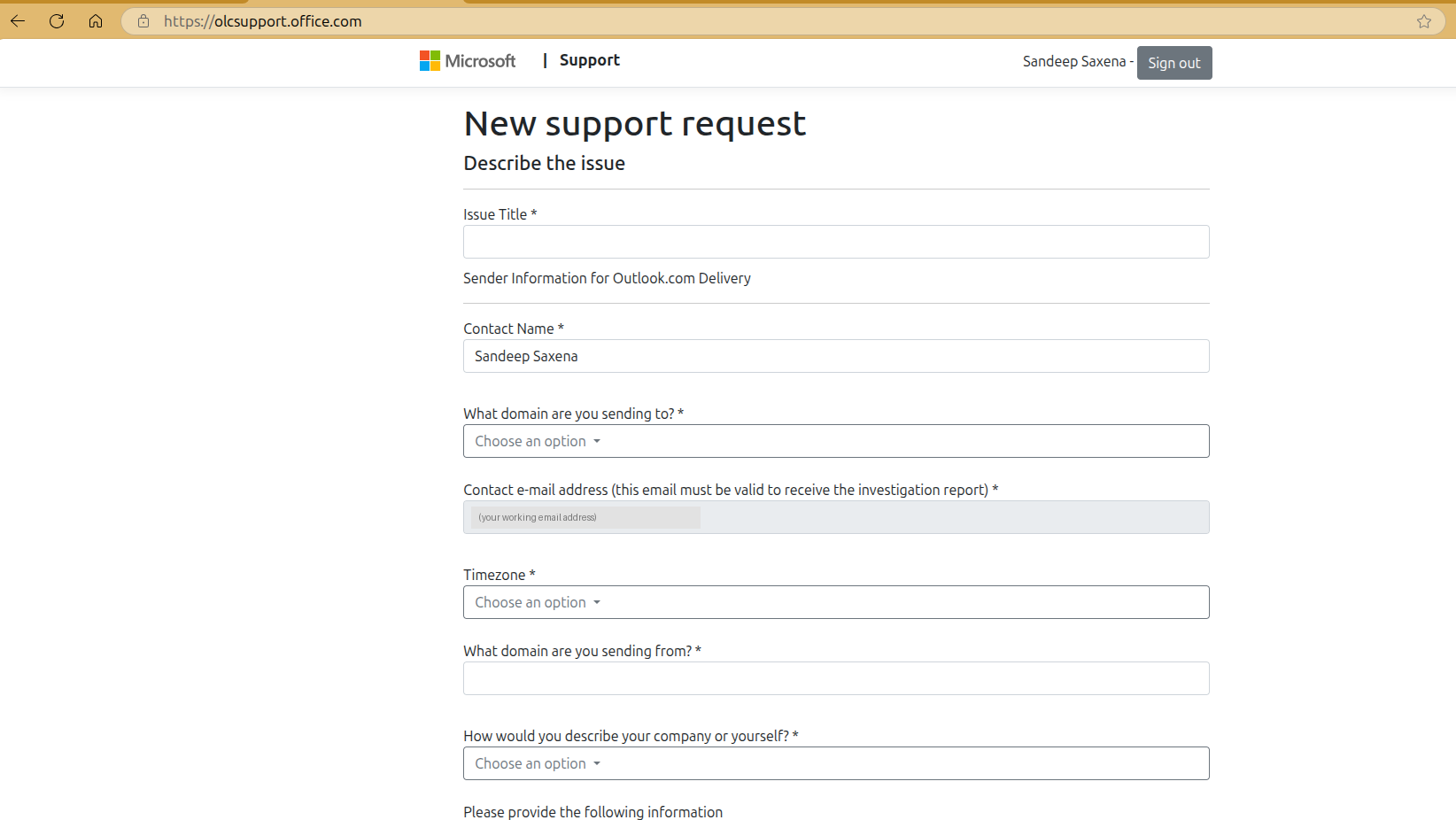
SC-00xand friends): the sender support form at olcsupport.office.com (also linked from the postmaster Troubleshooting page; requires a Microsoft account sign-in). Expectations set by Microsoft itself: “Submitting this information does not guarantee that any message you send… will be delivered.” In practice you get an automated reply with a ticket number, sometimes conditional mitigation. Come armed: your SNDS data, your JMRP enrollment, your authentication story. Tickets from senders who fixed nothing get form-letter denials.
The 2025-2026 sender requirements (and the code that enforces them)
Since May 5, 2025 (Microsoft’s own announcement), Microsoft applies explicit requirements to any domain sending 5,000+ messages/day to consumer Outlook.com addresses: SPF must pass, DKIM must pass, and DMARC must be published at minimum p=none and align with SPF or DKIM (preferably both). Non-compliant senders were first junked, and Microsoft’s enforcement now includes outright rejection with a dedicated code: 550 5.7.515 Access denied, sending domain does not meet the required authentication level. Beyond the hard authentication gate, Microsoft lists valid From/Reply-To addresses, functional unsubscribe links, list hygiene and honest subject lines as compliance expectations it reserves the right to enforce.
How it compares to the other majors:
| Microsoft (Outlook.com) | Google (Gmail) | Yahoo | |
|---|---|---|---|
| Threshold | 5,000+/day | 5,000+/day | undisclosed (“significant volume”) |
| SPF + DKIM | both must pass | both required | both required |
| DMARC minimum | p=none, aligned | p=none, aligned | p=none |
| Spam-rate ceiling | none published | 0.3% (aim ≤0.1%) | 0.3% |
| One-click unsubscribe (RFC 8058) | recommended only | required for bulk marketing | required |
| Rejection code | 550 5.7.515 | 4.7.x / 5.7.x family | - |
One under-reported consequence that works in your favour: Microsoft now sends DMARC aggregate (rua) reports - confirmed for consumer Outlook.com in the requirements FAQ, and for Microsoft 365 wherever the recipient tenant’s MX points directly at Microsoft. For years “Microsoft doesn’t send DMARC reports” was true and made Microsoft a blind spot; today, if you monitor your DMARC reports, you can see how your mail authenticates at Microsoft properties. (Neither service sends forensic/ruf reports.) Our free DMARC monitor turns those raw XML reports into a weekly digest that names each sending source, its SPF/DKIM selectors, and whether they aligned - which is precisely the evidence you need for every fix in this guide.
The debugging playbook
| Symptom | Most likely cause | Start here |
|---|---|---|
Hard bounce with SC/DY/OU code |
Consumer-side IP/content block | Decoder table above; fix cause, then mitigation form |
Hard bounce 5.7.606+ |
EOP banned IP | sender.office.com |
Bounce 5.1.8 sending from M365 |
You are a restricted entity | Admin: Restricted entities page |
Deferrals 421 RP-00x |
Reputation throttling | Reduce volume, warm up, let retries drain |
| Delivered to Junk at consumer Outlook.com | Domain reputation / weak auth / complaints | Headers: compauth + SCL; JMRP + SNDS; authenticate fully |
| Delivered to Junk at one specific company | That tenant’s policies or user block | Their admin: message trace, quarantine, SFV:BLK/SKB check |
| Junked at many M365 tenants | compauth fail or BCL threshold | Fix alignment; check BCL on seeds; dedicated subdomain |
| Accepted, in no folder at all | Quarantine (15-day default) or silent drop | Recipient-side quarantine check; then escalate |
| Everything fine except volume days | Requirements enforcement or rate limits | 5.7.515 check; platform sending limits (Lane A) |
The intake checklist: diagnosing a Microsoft 365 sender
This is the checklist we run on real consulting calls when the struggling sender is themselves on Microsoft 365 - the most common setup for B2B teams. Work top to bottom; each answer routes you to a different bucket of the playbook above. It works equally well as a self-audit.
- Bouncing, junked, quarantined, or silent? Bounce = read the code; junk = header forensics; silence = usually recipient-tenant quarantine (15-day hold) or your own outbound filtering.
- Collect 2-3 complete NDRs, unedited. 550 5.1.8 = YOUR mailboxes are restricted as suspected spammers; 5.7.606+ or SC-00x = mail is not leaving via Microsoft's IPs (see routing); 5.7.236 = someone sends from onmicrosoft.com.
- Only Microsoft recipients, or Gmail too? Gmail-also = domain/content problem; Microsoft-only = Microsoft reputation or policy.
- One recipient company, or scattered? One tenant = their policies/blocks - only their admin's message trace settles it. Scattered = your reputation; keep going.
- When did it start, and what changed that week? New tool, volume jump, new domain, an SPF/DMARC edit - there is almost always an event.
- Is 1:1 correspondence affected, or only sequences/campaigns? 1:1 affected = deep reputation problem; campaigns-only = volume, content, or behaviour.
- What actually sends - Outlook, or a tool over SMTP/Graph? How many mailboxes, at what per-mailbox daily volume and ramp? Exchange Online throttles at 30 messages/minute and 10,000 recipients/day per mailbox, plus the tenant-wide TERRL cap - burst-happy tools trip throttles and outbound-spam heuristics.
- Any bulk/newsletter traffic going through Exchange Online? Microsoft's own docs: it "isn't suited to accommodate bulk-mailing scenarios". Move bulk to an ESP on an aligned subdomain.
- Has any user appeared under Defender's Restricted entities, or triggered the "User restricted from sending email" alert? Past restrictions mean Microsoft already flagged the outbound pattern - today's junking is the same signal, milder.
- Send one message from an affected mailbox to a free @outlook.com seed and read the headers live. compauth=fail reason=001 = weak/missing auth; reason=1xx pass = stop blaming auth, look at content and behaviour.
- Is DKIM enabled for the CUSTOM domain in Defender (selector1/selector2 CNAMEs)? The most common M365 finding: default onmicrosoft.com signing never aligns, so everything rides on SPF - which breaks on any forward.
- How many DNS lookups is SPF at, and who edited it last? Tool sprawl past the 10-lookup limit = permerror = authentication collapse.
- Does DMARC have a rua address someone actually reads? Microsoft sends aggregate reports now - unread reports are discarded evidence of exactly this problem.
- Direct from Microsoft 365, or via a connector - hybrid on-prem, a security gateway, a smart host? A connector means Microsoft sees the vendor's or your own IP, not Microsoft's - a completely different reputation battlefield where IP-level codes and SNDS suddenly apply.
- Any devices or apps relaying as the domain - printers, CRM, ticketing? Unauthenticated strays poison the domain's authentication picture.
- Broad sudden junking everywhere, no NDRs, tenant looks clean? Suspect the high-risk delivery pool: outbound mail Microsoft flags as spammy exits via shared low-reputation IPs while the tenant sees nothing wrong.
- List source, verification, and bounce rate? Over ~3% invalid reads as namespace mining - the SC-002 signature.
- What links are in the mail - shared click-trackers, shorteners, free tracking domains? URL reputation junks more cold email than sender reputation; shared trackers inherit every other customer's sins.
- Identical bodies at volume, or real per-recipient variance? Are opt-outs honored immediately? Template mass-sends plus ignored opt-outs feed the complaint signals behind SC-004 and BCL.
By the end of the checklist the sender lands in exactly one bucket: restricted outbound (behaviour), missing custom-domain DKIM or broken SPF (auth), bulk through the wrong pipe (architecture), URL/tracker reputation (content), one tenant’s policy (their admin’s problem), or a connector misroute (infrastructure). Each has a different fix - and the NDR codes plus one seed-mailbox header capture usually decide it in twenty minutes.
Want the evidence collected for you?
Send one real email to our free deliverability audit and get your authentication, alignment, blacklist status and content scoring in one report - or start free DMARC monitoring and watch how Microsoft actually authenticates your mail, week by week.
Run the free audit Free DMARC monitoringFrequently asked questions
Why do my emails go to junk in Outlook but not Gmail?
Different reputation systems with different memories. Microsoft weighs its own history of your domain, IP and complaint record, computes its own composite authentication verdict (compauth) even where Gmail would be satisfied, and in Microsoft 365 the recipient tenant's own policies sit on top. The headers in a test mailbox tell you which layer junked you: Authentication-Results (compauth) plus the antispam verdict headers - X-Forefront-Antispam-Report in Microsoft 365, or on consumer Outlook.com the SCL in X-MS-Exchange-Organization-SCL and the delivery verdict in X-Microsoft-Antispam-Mailbox-Delivery.
Does Microsoft have something like Google Postmaster Tools?
For IP owners, yes: SNDS shows per-IP filter verdicts, complaint rates and volume as seen by Outlook.com, and JMRP is the complaint feedback loop. There is no domain-level dashboard equivalent for senders using Workspace/M365 mailboxes or ESPs - for those lanes, DMARC aggregate reports (which Microsoft now sends) are the closest visibility you can get.
How do I get my IP off Microsoft's blocklist?
Depends which blocklist. EOP banned IP (5.7.606-649): self-service at sender.office.com, up to 24 hours or longer. Banned sender (5.7.511): email [email protected] with the full NDR - Microsoft states 48 hours. Consumer blocks (SC-00x): the Outlook.com sender support form, after you have genuinely fixed the cause. S3150 range blocks can only be resolved by the network owner.
What is compauth in Microsoft email headers?
Composite authentication - Microsoft's own verdict combining SPF, DKIM, DMARC and inference, evaluated against the visible From domain. compauth=fail reason=001 means implicit authentication failed (weak or missing records); reason=000 means an explicit DMARC failure with an enforcing policy. Fully aligned SPF and DKIM plus a DMARC record moves you to compauth=pass.
What are Microsoft's sender requirements for 2026?
Domains sending 5,000+ messages a day to consumer Outlook.com addresses must pass SPF and DKIM and publish an aligned DMARC record of at least p=none; non-compliant mail can be rejected with 550 5.7.515. Microsoft also expects valid From/Reply-To addresses, functional unsubscribe links and clean list practices, and unlike Google and Yahoo it publishes no numeric spam-rate ceiling - and does not currently mandate one-click RFC 8058 unsubscribe.
Does Microsoft send DMARC aggregate reports?
Yes - a relatively recent change. Consumer Outlook.com sends rua aggregate reports to the address in your DMARC record, and Microsoft 365 sends them for tenants whose MX points directly at Microsoft. Neither sends forensic (ruf) reports. If your DMARC record has no rua address - or nothing is reading the reports - you are discarding the only per-source authentication evidence Microsoft gives every sender for free.